O envio de formulários no site de suporte está temporariamente indisponível para manutenção programada. Se precisar assistência imediata, entre em contato com o suporte técnico. Lamentamos o inconveniente.
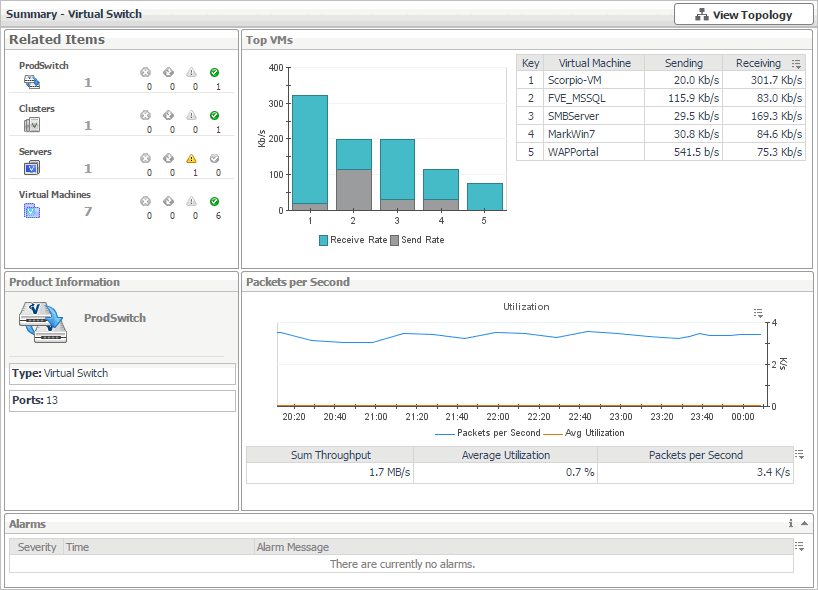
Alarm Message, Severity, or Time. Displays the Alarm dialog box, showing additional information about the alarm. For more information about alarms in Foglight, see the Foglight User Help.
Utilization chart, Avg Utilization. The average percentage of the network resources available to the switch that are in use over the selected time period.
Virtual Machines. Displays the Virtual Machines dwell, showing the names and states of all virtual machines that are associated with the selected virtual switch.
The Virtual Switch Topology View visualizes the relationships between the objects in your environment through an interactive map. The map illustrates how different components relate to each other, and the levels of the available resources available to them.
The Hyper-V Environment dashboard contains the FAQts tab that you can use to ask questions about your monitored systems and review the answers. In the Categories pane, the FAQts view shows several question categories. Clicking a category shows the questions belonging to that category in the Questions pane. From there, clicking a question shows the answer on the right.
Você pode encontrar ajuda de suporte on-line para *produto* da Quest em um local de suporte afiliado. Clique em Continue (Continuar) para ser direcionado ao conteúdo de suporte correto e à assistência a *produto*.
Documentos relacionados
The document was helpful.
Selecione a classificação
I easily found the information I needed.
Selecione a classificação
Encerramento do suporte aos navegadores IE 8, 9 e 10
O Portal da Quest Software não é mais compatível com IE8, 9 e 10. Recomendamos a atualização do navegador para a versão mais recente do Internet Explorer ou do Chrome.