지금 지원 담당자와 채팅
지원 담당자와 채팅

Foglight for Hyper-V 5.7.0 - User and Reference Guide

About Foglight for Hyper-V Agent administration Performance monitoring with the Hyper-V Environment dashboard Performance investigation with the Hyper-V Explorer Foglight for Hyper-V alarms Appendix: Hyper-V Agent error codes

Summary - Virtual Switch view

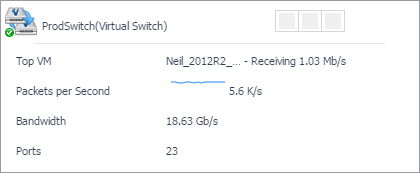
The Summary - Virtual Switch view illustrates the overall network utilization and the levels of overall network traffic for a selected virtual switch.
This view appears in the Quick-View on the left when you select a virtual switch in the Virtual Switches view.
Table 68. Alarms
Alarm Message. An explanation about why the alarm occurred.
Severity. Indicates the alarm severity: Warning, Critical, or Fatal.
Time. The time at which the alarm was generated.
Alarm Message, Severity, or Time. Displays the Alarm dialog box, showing additional information about the alarm. For more information about alarms in Foglight, see the Foglight User Help.
Utilization chart, Avg Utilization. The average percentage of the network resources available to the switch that are in use over the selected time period.
Utilization chart, Packets per Second. The average rate of the data packets that are sent to the virtual switch over the selected time period.
Utilization table, Average Utilization. The average percentage of the network resources available to the switch that are currently in use.
Utilization table, Packets per Second. The average rate of the data packets that are sent to the virtual switch.
Utilization table, Sum Throughput. The current rate of network throughput for the selected switch.
Utilization chart. Displays the Utilization dialog box.
Figure 139. Utilization dialog box
Ports. The number of ports that are available for use on the selected virtual switch.
Type. The type of the switch: Virtual Switch.
Table 71. Related Items
Clusters. The number of clusters associated with the selected virtual switch, followed by the related alarm counts.
Servers. The number of servers associated with the selected virtual switch, followed by the related alarm counts.
Virtual Machines. The number of virtual machines that are associated with the selected virtual switch, followed by the related alarm counts.
Virtual Switch. Represents the selected virtual switch. Shows the counts of alarm generated against the switch.
Clusters. Displays the Clusters dwell, showing the names and states of all clusters that are associated with the selected virtual switch.
Figure 140. Clusters dwell
Servers. Displays the Servers dwell, showing the names and state of the servers associated with the selected virtual switch.
Figure 141. Servers dwell
Virtual Machines. Displays the Virtual Machines dwell, showing the names and states of all virtual machines that are associated with the selected virtual switch.
Figure 142. Virtual Machines dwell
Virtual Switch. Displays the Other Items Inventory dwell, showing the state of the selected virtual switch.
Table 72. Top VMs
Key. An indicator of how virtual machine ranks in the list of top consumers.
Receiving. The average inbound data transfer rate for the virtual machine.
Sending. The average outbound data transfer rate for the virtual machine.
Top VM chart, Receive Rate. The average inbound data transfer rate for the monitored switch over the selected time period.
Top VM chart, Send Rate. The average outbound data transfer rate for the monitored switch over the selected time period.
Virtual Machine. The name of the virtual machine identified amongst top network consumers.

Virtual Switch Topology view

The Virtual Switch Topology View visualizes the relationships between the objects in your environment through an interactive map. The map illustrates how different components relate to each other, and the levels of the available resources available to them.
In a large multi-component environment, dependency maps are likely complex and may not fit your screen. The NAVIGATOR in the top-right corner allows you to easily set the zoom level by dragging the slider into the appropriate position.
Figure 145. Navigator view

About frequently asked questions

The Hyper-V Environment dashboard contains the FAQts tab that you can use to ask questions about your monitored systems and review the answers. In the Categories pane, the FAQts view shows several question categories. Clicking a category shows the questions belonging to that category in the Questions pane. From there, clicking a question shows the answer on the right.
Figure 149. FAQts tab

About reports

You can generate, copy, and edit reports using the Reports tab on the Hyper-V Environment dashboard, or alternatively the Reports dashboard included with the Management Server.
Figure 150. Reports tab
For more information on how to use this tab to create and manage reports, see the Managing Capacity in Virtual Environments User Guide. For more information about the Reports dashboard, see the Foglight User Help.
관련 문서

The document was helpful.

평가 결과 선택

I easily found the information I needed.

평가 결과 선택