Submitting forms on the support site are temporary unavailable for schedule maintenance. If you need immediate assistance please contact technical support. We apologize for the inconvenience.
The Volume view shows the data transfer rates and latency detected for the selected volume. It also identifies the virtual machines that use the highest amounts of the volume resources.The information provided on this tab can help you prevent potential bottlenecks by reallocating disk resources where they are most needed.
I/O Distribution. A pie chart indicating how much each virtual machine associated with the selected volume contributes to the overall use of I/O resources.
VM Offenders, I/O. The rate at which the virtual machine writes to and reads from the volume.
•
VM Offenders, IOps. The number of disk read and write operations the virtual machine performed from the beginning of the selected time range.
•
VM Offenders, Latency. The latency rate detected for the disk read and write operations the virtual machine performed from the beginning of the selected time range.
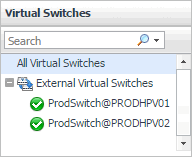
Selecting the All Virtual Switches node displays the overall resource utilization for all virtual switches in your integrated system and identifies the ones that consume the highest amount of network resources in the Summary - All Virtual Switches view on the right. Similarly, selecting a virtual switch node shows switch-specific metrics in the Summary - Virtual Switch view.
The Summary - All Virtual Switches view displays overall resource utilization information for a group of virtual switches and identifies the ones that consume the highest amounts of system resources, potentially causing performance bottlenecks.
Alarm Message, Severity, or Time. Displays the Alarm dialog box, showing additional information about the alarm. For more information about alarms in Foglight, see the Foglight User Help.
Top Bandwidth Consumers chart. For each identified virtual switch, the chart displays the percentage of network resources available to it that are in use over the selected time period.
•
Utilization. The percentage of network resources available to the virtual switch that is currently in use.
•
Virtual Switches. The name of the virtual switch identified amongst top bandwidth consumers.





 in the