O envio de formulários no site de suporte está temporariamente indisponível para manutenção programada. Se precisar assistência imediata, entre em contato com o suporte técnico. Lamentamos o inconveniente.
ApexSQL Complete is a SQL Server Management Studio and Visual Studio add-in designed to speed up coding. It completes SQL statements automatically, fills in SQL fragments, generates outlines for the SQL script structure and speeds up coding with T-SQL code snippets.
ApexSQL Complete supports inserting ready-made static T-SQL code snippets into SQL scripts, and the primary purpose of the Snippets feature is to make reusing as easy as possible and therefore avoid wasting time on repetitive coding and inadvertent errors. The feature inserts predefined SQL fragments and replaces variables with context specific values to generate SQL at run-time.
ApexSQL Complete is configured with a set of predefined T-SQL code snippets, covering the most popular SQL constructs, which are listed in the Snippets manager. The manager also includes a code preview for each selected snippet:
In order to use ApexSQL Complete’s snippets, all that needs to be done is to type a snippet’s name in the query editor:
and then press Ctrl+Enter. This action will then immediately deploy a predefined code:
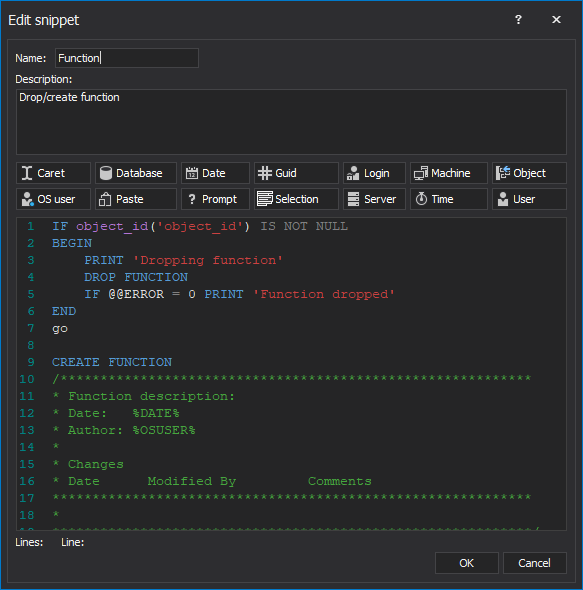
Also, there is an option to choose to create custom T-SQL code snippets or to simply change the already existing ones in the Create new snippet and Edit snippet windows. Both of these windows contain a list of available macros which can be used in snippets. For instance, in order to create a snippet that will later be used to deploy a predefined code for a function, inserting %DATE% macro in the code body will later return the current date. Likewise, inserting %SERVER% macro will return the connection server name, %LOGIN% will show a connection login, %DB% will return a connection database, and so on. Each macro will be automatically replaced with a context specific value:
During routine edit operations, ApexSQL Complete can save frequently used SQL code structures as snippets, and insert context-specific values as needed. By utilizing these templates, it can significantly speed up SQL coding process and avoid typing errors.
Your Request will be reviewed by our technical reviewer team and, if approved, will be added as a Topic in our Knowledgebase.
Conteúdo recomendado
Produto(s):
ApexSQL Complete
Tópico(s):
How To
Histórico do artigo:
Criado em: 6/19/2019 Última atualização em: 5/7/2023
Thank you for your feedback for Topic Request
Your Request will be reviewed by our technical reviewer team and, if approved, will be added as a Topic in our Knowledgebase.
Bem-vindo ao Suporte
Você pode encontrar ajuda de suporte on-line para *produto* da Quest em um local de suporte afiliado. Clique em Continue (Continuar) para ser direcionado ao conteúdo de suporte correto e à assistência a *produto*.
Search All Articles
Encerramento do suporte aos navegadores IE 8, 9 e 10
O Portal da Quest Software não é mais compatível com IE8, 9 e 10. Recomendamos a atualização do navegador para a versão mais recente do Internet Explorer ou do Chrome.
 In order to use ApexSQL Complete’s snippets, all that needs to be done is to type a snippet’s name in the query editor:
 and then press Ctrl+Enter. This action will then immediately deploy a predefined code:
 Also, there is an option to choose to create custom T-SQL code snippets or to simply change the already existing ones in the Create new snippet and Edit snippet windows. Both of these windows contain a list of available macros which can be used in snippets. For instance, in order to create a snippet that will later be used to deploy a predefined code for a function, inserting %DATE% macro in the code body will later return the current date. Likewise, inserting %SERVER% macro will return the connection server name, %LOGIN% will show a connection login, %DB% will return a connection database, and so on. Each macro will be automatically replaced with a context specific value:
 During routine edit operations, ApexSQL Complete can save frequently used SQL code structures as snippets, and insert context-specific values as needed. By utilizing these templates, it can significantly speed up SQL coding process and avoid typing errors.

