Al momento non è possibile inviare moduli sul sito di supporto per pianificare la manutenzione. Se necessiti di assistenza immediata, contatta il supporto tecnico. Ci scusiamo per il disagio.
Questo articolo ti è servito per risolvere il problema?
Seleziona valutazione
Titolo
How to code faster with SQL Server code snippets
Risoluzione
ApexSQL Complete is a SQL Server Management Studio and Visual Studio add-in designed to speed up coding. It completes SQL statements automatically, fills in SQL fragments, generates outlines for the SQL script structure and speeds up coding with T-SQL code snippets.
ApexSQL Complete supports inserting ready-made static T-SQL code snippets into SQL scripts, and the primary purpose of the Snippets feature is to make reusing as easy as possible and therefore avoid wasting time on repetitive coding and inadvertent errors. The feature inserts predefined SQL fragments and replaces variables with context specific values to generate SQL at run-time.
ApexSQL Complete is configured with a set of predefined T-SQL code snippets, covering the most popular SQL constructs, which are listed in the Snippets manager. The manager also includes a code preview for each selected snippet:
In order to use ApexSQL Complete’s snippets, all that needs to be done is to type a snippet’s name in the query editor:
and then press Ctrl+Enter. This action will then immediately deploy a predefined code:
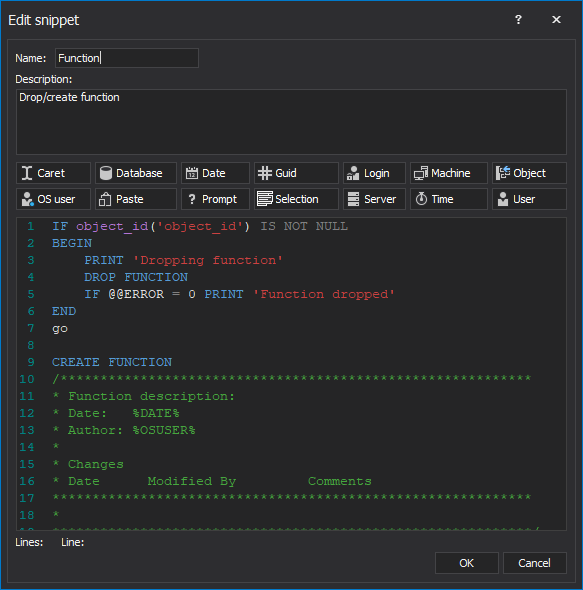
Also, there is an option to choose to create custom T-SQL code snippets or to simply change the already existing ones in the Create new snippet and Edit snippet windows. Both of these windows contain a list of available macros which can be used in snippets. For instance, in order to create a snippet that will later be used to deploy a predefined code for a function, inserting %DATE% macro in the code body will later return the current date. Likewise, inserting %SERVER% macro will return the connection server name, %LOGIN% will show a connection login, %DB% will return a connection database, and so on. Each macro will be automatically replaced with a context specific value:
During routine edit operations, ApexSQL Complete can save frequently used SQL code structures as snippets, and insert context-specific values as needed. By utilizing these templates, it can significantly speed up SQL coding process and avoid typing errors.
Feedback inviato
Questo articolo ti è servito per risolvere il problema?
Your Request will be reviewed by our technical reviewer team and, if approved, will be added as a Topic in our Knowledgebase.
Contenuti consigliati
Prodotto/i:
ApexSQL Complete
Argomento/i:
How To
Cronologia articoli:
Data di creazione: 6/19/2019 Ultimo aggiornamento: 5/7/2023
Thank you for your feedback for Topic Request
Your Request will be reviewed by our technical reviewer team and, if approved, will be added as a Topic in our Knowledgebase.
Questo è il portale del supporto
Puoi trovare aiuto e supporto online per Quest *prodotto* sul sito di supporto di un affiliato. Fai clic su Continua per essere reindirizzato ai contenuti e all'assistenza corretti per *prodotto*.
Cerca in tutti gli articoli
Internet Explorer 8, 9 e 10 non sono più supportati
Il portale Quest Software non supporta più Internet Explorer 8, 9, e 10. Si consiglia di aggiornare il browser all'ultima versione di Internet Explorer o Chrome.
 In order to use ApexSQL Complete’s snippets, all that needs to be done is to type a snippet’s name in the query editor:
 and then press Ctrl+Enter. This action will then immediately deploy a predefined code:
 Also, there is an option to choose to create custom T-SQL code snippets or to simply change the already existing ones in the Create new snippet and Edit snippet windows. Both of these windows contain a list of available macros which can be used in snippets. For instance, in order to create a snippet that will later be used to deploy a predefined code for a function, inserting %DATE% macro in the code body will later return the current date. Likewise, inserting %SERVER% macro will return the connection server name, %LOGIN% will show a connection login, %DB% will return a connection database, and so on. Each macro will be automatically replaced with a context specific value:
 During routine edit operations, ApexSQL Complete can save frequently used SQL code structures as snippets, and insert context-specific values as needed. By utilizing these templates, it can significantly speed up SQL coding process and avoid typing errors.

