|
TIP: If you are using FxV as your real user data source, you must also associate hit filter mappings with Java™ requests and real user data, as described in Associating FxV hitfFilter mappings for response time breakdowns. |
|
1 |
|
2 |
On the Application Servers Administration dashboard, click Nexus Administration. |
|
3 |
On the Nexus Administration page, click the Recording Settings tab. |
|
4 |
On the Recording Settings view, click the name of the Nexus™ profile that you want to configure, and select Edit from the menu that opens. |
|
5 |
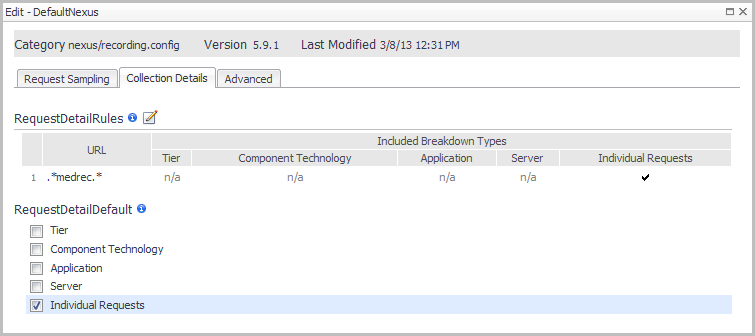
Click the Collection Details tab. |
|
6 |
|
8 |
Select the Regex check box. |
|
9 |
Click the URL box and type the URL for which you want to enable individual requests. |
|
10 |
Select the Individual check box. |
|
11 |
Click OK. |
|
12 |
Select the RequestDetailDefault > Individual Requests check box. |
|
13 |
Click Save. |
|
1 |
On the navigation panel, click Administration > Agents > Agent Properties. |
|
2 |
In the Namespace > Type column, expand the JavaEE module (click the + sign). |
|
3 |
Select recording.config. |
|
4 |
|
5 |
|
6 |
Click Save. |



 beside