Chat now with support
Chat with Support

Foglight for Application Operations 5.9.8 - User Guide

Introducing Foglight APM Monitoring Transactions Examining Response Times Examining Error Breakdowns Viewing Real User Activity from a Geographical Perspective Using the SOC Transactions Tab Creating Custom Drag-and-Drop Dashboards APM Tile and View Reference Appendix: Enabling End User Transactions from FxM and FxV

Hits and Pages tabs

Click Find Related Hits to open the Search Hits page. For information about searching hits, see the Foglight APM User Guide.
Click Advanced Find to open a list from which you can select a specific type of search. Choose from hits with: back end violations, end to end violations, or errors. The Hit Search runs with your selected criteria. Any results are returned on the Search Hits page. For information about searching hits, see the Foglight APM User Guide.

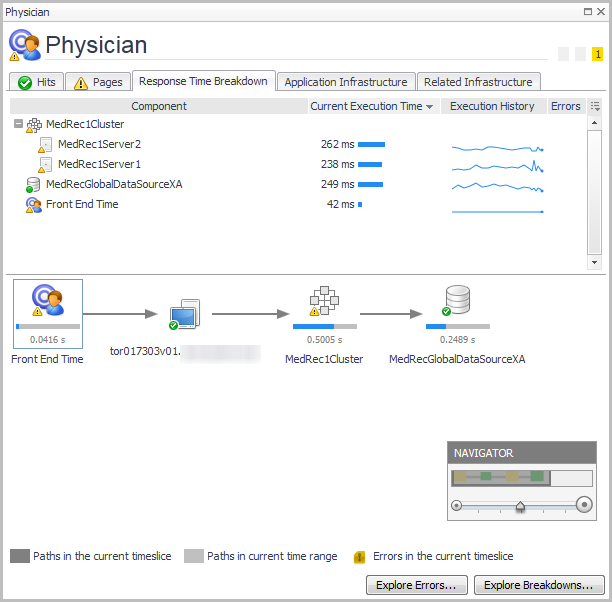
Response Time Breakdown tab

Click Explore Errors — see Examining Error Breakdowns for details.
Click Explore Breakdowns — see Examining Response Times for details.
TIP: If you click a datasource component icon, the details view also includes a Map to Application Component button. For more information, see Mapping datasources.
Click More Details to drill down to a detailed view of the selected application component. For example, from an application server component, you can access the Java application server details view.

Application Infrastructure tab

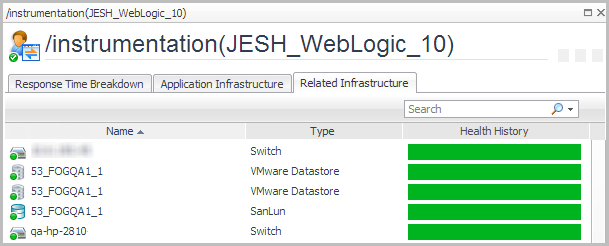
Related Infrastructure tab

VMware® Datastore
Related Documents

The document was helpful.

Select Rating

I easily found the information I needed.

Select Rating