Chat now with support
Chat with Support

Foglight APM for Real User Experience 5.9.11 - User Guide

Getting started with Foglight APM Monitoring Transactions Viewing Real User Activity from a Geographical Perspective Assessing real user experiences during key sequences Monitoring the performance of web sites and endpoints Searching APM data Replaying sessions, hits, and sequences Visualizing search results Creating Custom Drag-and-Drop Dashboards APM Tile and View Reference

Importing sessions

Imported sessions appear in the same list as all saved sessions. When naming imported sessions, you may want to include your name along with other identifying information for the session.

1
2
Click Import.
3
Click Choose file to import.
6
Click Import.

Replaying saved sessions

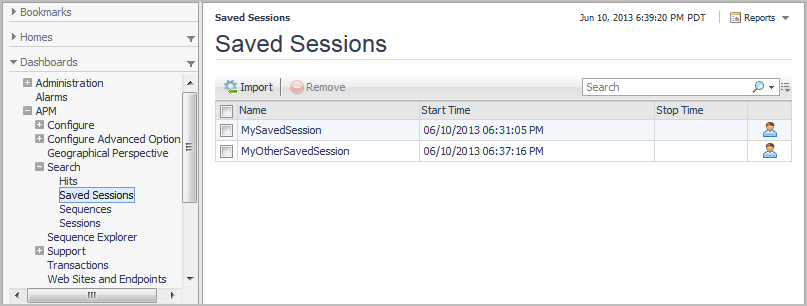
The Saved Sessions dashboard contains all sessions saved or imported by Foglight users with the role of APM Administrator or APM Operator.

1


Visualizing search results

It can often be helpful to visualize search results as aggregated values in a map or in a pivot chart. For more information, see the following topics:

Viewing search results in a map

From the Search dashboards, you can gain a geographical perspective on the current search results with maps. Maps can help you visualize an aggregate detail by country, region, or city. For example, a map can help you answer a question such as “Given these search results, which cities had the highest number of errors?” Maps are available for hits and sessions.

TIP: If maps do not display in your browser—for example, if you are using Microsoft® Internet Explorer® version 8 or earlier—try using a different browser. For a list of supported browsers, see the Foglight System Requirements and Platform Support Guide.

You interact with a search results map in the much the same way as the Geographical Perspective dashboard. For more information, see Viewing Real User Activity from a Geographical Perspective.

Figure 43. Map dashboard
5
If you want to see all search results in this dashboard, click Remove Filtering. You can return to the subset of results by clicking Restore Filtering.
Related Documents

The document was helpful.

Select Rating

I easily found the information I needed.

Select Rating