Chat now with support
Chat with Support

Foglight for Application Operations 5.9.8 - User Guide

Introducing Foglight APM Monitoring Transactions Examining Response Times Examining Error Breakdowns Viewing Real User Activity from a Geographical Perspective Using the SOC Transactions Tab Creating Custom Drag-and-Drop Dashboards APM Tile and View Reference Appendix: Enabling End User Transactions from FxM and FxV

.NET tile

Use the .NET tile to gather performance information about the state of .NET® transactions monitored by Foglight for Microsoft .NET, version 5.6.x or earlier.
Topology Object Name: NETApplicationInstance
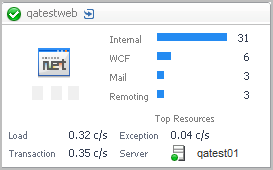
Alarms. A count of fatal, critical, and warning alarms on the host system.
Internal. All method calls that are not related to any other call types in this list.
Database. Method calls related to databases.
Web Svc. Method calls related to web services.
Mail. Method calls related to sending mail.
Remoting. Method calls related to remoting client-side resources.
WCF. Method calls related to WCF client-side resources.
Load. The average load on the .NET® system.
Transaction. The current number of transactions per second.
Exception. The current number of exceptions per second.
Server. The .NET server name.

Application Servers - Java tile

Topology Object Name: CustomApplicationTransaction
Hits. The number of calls served in the most recent collection interval.
Health History Bar. The color-coded bar represents the alarm state of the monitored component over the time range selected in the SOC. The color of the bar changes depending on the alarm state. Red indicates a Fatal state, orange indicates Critical, yellow means Warning, and green is the Normal state.
Response Time. A plot of the request response time.
Exceptional Exits. The number of exceptional exits recorded.
Bottleneck. Indicates the portion of the application where requests are experiencing slowdowns.

DB2 tile

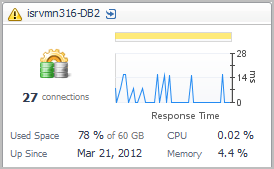
Number of Connections. The sum of the average number of local and remote DB2 connections.
Health History Bar. The color-coded bar represents the alarm state of the monitored component over the time range selected in the SOC. The color of the bar changes depending on the alarm state. Red indicates a Fatal state, orange indicates Critical, yellow means Warning, and green is the Normal state.
Response Time. A plot of the database response time.
Used Space. The average amount of database space used, as a percentage of the total space available.
Up Since. The date the database was last restarted.
CPU. The average CPU usage for all DB2 agents.
Memory. The average memory usage for all DB2 agents.

Host tile

NOTE: For hosts, always select the host object, regardless of whether or not the host is virtual (for example, Hyper-V® or VMware®). Foglight looks for the appropriate host extensions and displays the associated host dashboard (physical or virtual).
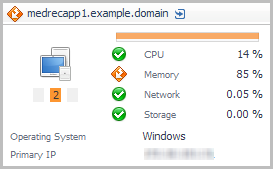
Alarms. A count of fatal, critical, and warning alarms on the host system.
CPU. An icon representing the health state of the CPU, and the CPU utilization expressed as a percentage of the total available.
Memory. An icon representing the health state of the memory, and the memory utilization expressed as a percentage of the total available.
Network. An icon representing the health state of the network transactions, and the network utilization expressed as a percentage of the total available.
Storage. An icon representing the health state of the storage (disk space), and the disk utilization expressed as a percentage of the total available.
Operating System. The name of the operating system.
Primary IP. The primary IP address for the host system.
Related Documents

The document was helpful.

Select Rating

I easily found the information I needed.

Select Rating