Chat now with support
Chat with Support

Foglight for Application Operations 5.9.8 - User Guide

Introducing Foglight APM Monitoring Transactions Examining Response Times Examining Error Breakdowns Viewing Real User Activity from a Geographical Perspective Using the SOC Transactions Tab Creating Custom Drag-and-Drop Dashboards APM Tile and View Reference Appendix: Enabling End User Transactions from FxM and FxV

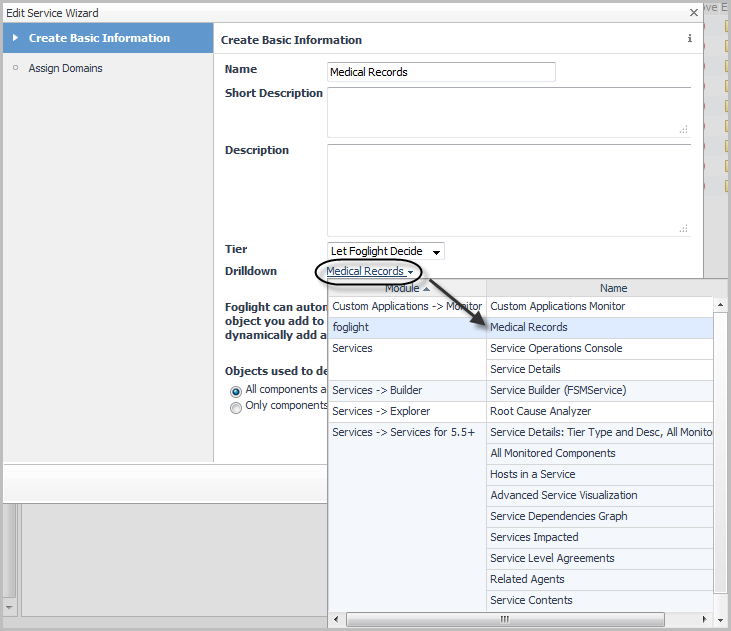
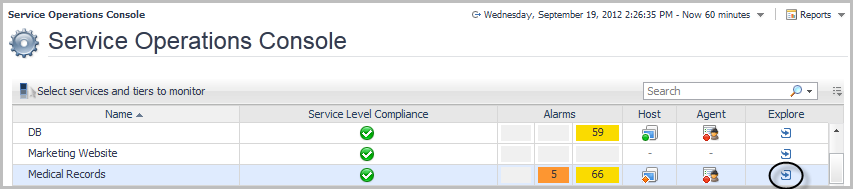
Linking a custom dashboard to the Explore icon for a service

1
Open the Service Builder. Under Dashboards, click Services > Service Builder.
7
Click Finish.

APM Tile and View Reference

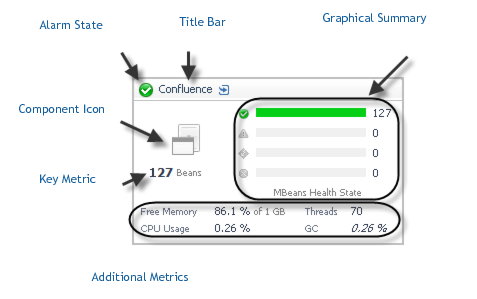
Overview of APM tiles

NOTE: The values of these metrics are always current, unless the value appears in italics (for example, GC 0.26%). Italicized metrics reflect the period average instead of the current value.

Application Servers - .NET tile

Use the Application Servers - .NET tile to gather performance information about the state of .NET® transactions monitored by Foglight for Microsoft .NET, version 5.9.x or later.
Topology Object Name: CustomApplicationTransaction
Hits. The number of calls served in the most recent collection interval.
Health History Bar. The color-coded bar represents the alarm state of the monitored component over the time range selected in the SOC. The color of the bar changes depending on the alarm state. Red indicates a Fatal state, orange indicates Critical, yellow means Warning, and green is the Normal state.
Response Time. A plot of the request response time.
Exceptional Exits. The number of exceptional exits recorded.
Bottleneck. Indicates the portion of the application where requests are experiencing slowdowns.
Related Documents

The document was helpful.

Select Rating

I easily found the information I needed.

Select Rating