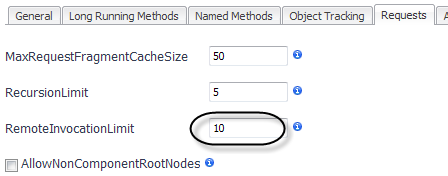
The RemoteInvocationLimit determines the maximum number of calls that the Java EE agent follows from a single method to a remote system. Beyond this number, the Java EE agent only collects and aggregates overall performance information for the remote system invocations. This is done for two reasons:
|
1 |
Click the Requests tab of the Edit dialog box. |
|
2 |
Type a value in the RemoteInvocationLimit box. |
|
3 |
Click Save. |
If you manually edit the instrumentation.config file, use the following syntax to specify the remote invocation limit.
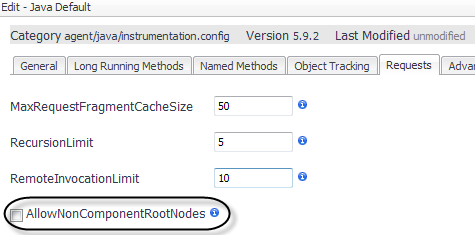
By default, the Java EE agent collects requests that start at a defined component technology (such as HTTP, JMS, RMI, EJB, or Servlet) or a custom component. Enable the AllowNonComponentRootNodes setting to allow the Java EE agent to collect information on requests that start at any method. This may be useful when using the X-Agent or the StopCurrentRequestInMethods configuration setting. For more information, see Separating requests by parent method.
By default, this setting is disabled.
|
1 |
Click the Requests tab of the Edit dialog box. |
|
2 |
Select the check box for AllowNonComponentRootNodes. |
|
3 |
Click Save. |
If you manually edit the instrumentation.config file, use the following syntax to enable non-component root nodes.
AllowNonComponentRootNodes = true;
Use the StopCurrentRequestInMethods parameter as a separate parameter when you want to stop the request in the configured method. Once stopped, the next method entered starts a new request. The data collected for the original request is not lost but has stopped collecting. The benefit of using the StopCurrentRequestInMethods parameter is to organize and specify the time range during which the Java EE agent collects requests.
The StopCurrentRequestInMethods setting splits one request type into two or more request types where the original request ends on the specified method and new requests are started on children of the specified method.
For example, suppose that you have the following request:
GET /foo/bar -> service() -> doGet() -> doSomeStuff() -> doMoreStuff()
and you want to configure it to split on the doGet() method. The result is two requests:
GET /foo/bar -> service() -> doGet()
doSomeStuff() -> doMoreStuff()
For more information, see Allowing non-component root nodes , and the Managing Nexus Recording Settings topic in the Managing Application Servers Administration and Configuration Guide. |
|
1 |
Click the Requests tab of the Edit dialog box. |
|
2 |
|
3 |
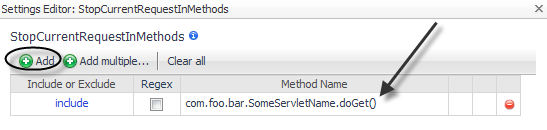
Click  Add to add a stop method. Add to add a stop method. |
|
a |
Leave the Include or Exclude option set to include (the default setting). |
|
b |
This example does not use a regular expression, so leave the Regex check box cleared. |
|
c |
Click in the Method Name box and type the name of the method that you want the agent to stop on. In this example, that is: com.foo.bar.SomeServletName.doGet() |
|
5 |
Click OK. |
|
6 |
GET /foo/bar -> service() -> doGet()
doSomeStuff() -> doMoreStuff()
If you manually edit the instrumentation.config file, use the following syntax to specify the stop methods.
StopCurrentRequestInMethods = MethodList();
For example, if the following request
GET /foo/bar -> service() -> doGet() -> doSomeStuff() -> doMoreStuff()
is configured to split on the doGet() method as follows:
StopCurrentRequestInMethods = MethodList(
include "com.foo.bar.SomeServletName.doGet()",
);
the result will be the following two requests:
GET /foo/bar -> service() -> doGet()
doSomeStuff() -> doMoreStuff()
By default, requests that have been split using the StopCurrentRequestInMethods setting also appear as separate requests when collecting in single-trace mode.
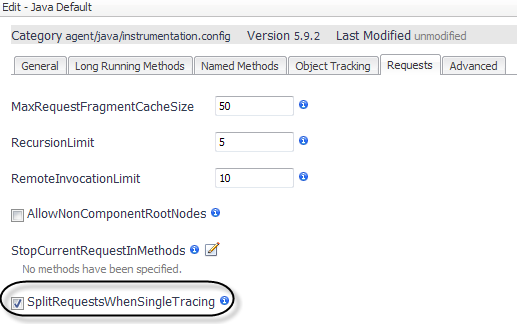
Disabling the SplitRequestsWhenSingleTracing setting prevents request splitting when collecting a single trace. Requests that would otherwise be separated appear as part of the same call tree. In some situations, the additional context may be helpful for more detailed analysis.
|
1 |
Click the Requests tab of the Edit dialog box. |
|
2 |
Clear the check box for SplitRequestsWhenSingleTracing. |
|
3 |
Click Save. |
If you manually edit the instrumentation.config file, use the following syntax to specify that requests should be split while single tracing.



 beside