立即与支持人员聊天
与支持团队交流

Foglight for PeopleSoft 5.6.11 - User and Reference Guide

Using Foglight for PeopleSoft
Exploring the PeopleSoft Dashboards Foglight for PeopleSoft Agents PS_AppMonitor Agent PS_AppServer Agent PS_DB2SQL Agent PS_MSSQL Agent PS_OracleSQL Agent PS_PPM Agent PS_SchedMonitor Agent PS_SchedServer Agent PS_Scheduler Agent Manual Agent Naming Deployment Scenario Procedures
Foglight for PeopleSoft Reference
Views
PS_AppServer Views PS_DB2SQL Views PS_MSSQL Views PS_OracleSQL Views PS_PPM Views PS_SchedServer Views PS_Scheduler Views
Data

PS_SchedMonitor Agent

PS_SchedMonitor Agent Properties

For more information about working with agent properties, see the Foglight Administration and Configuration Guide.
On the navigation panel, under Dashboards, choose Administration > Agents > Agent Properties.
On the navigation panel, under Dashboards, choose Administration > Agents > Agent Status.

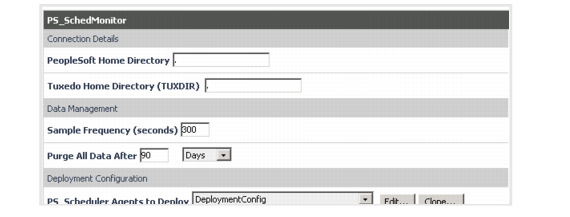
Setting the PS_SchedMonitor Connection Details

The PS_SchedMonitor Agent uses the information in the Connection Details properties to discover the PeopleSoft Tuxedo configuration files for all domains and searches for all application server domains in the path looking for the psprcs.cfg file. The Deployment Configuration Lists for the PS_Scheduler and PS_SchedServer are populated with all discovered Scheduler domain(s).
1
Go to the Connection Details set of properties.
4
Click Save.

Setting the PS_SchedMonitor Data Management Parameters

1
Go to the Data Management set of properties.
2
Enter the collection interval in the Sample Frequency (seconds) box.
3
Ignore the Purge All Data After box. This field is not functional.
4
Click Save.
相关文档

The document was helpful.

选择评级

I easily found the information I needed.

选择评级