Chat now with support
Chat with Support

Foglight for Hyper-V 5.7.2 - User and Reference Guide

About Foglight for Hyper-V Agent administration Performance monitoring with the Hyper-V Environment dashboard Performance investigation with the Hyper-V Explorer Foglight for Hyper-V alarms Appendix: Hyper-V Agent error codes

SOFS Server monitoring

SOFS Servers view

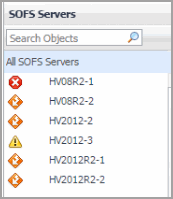
The SOFS Servers view is a tree view. It lists the SOFS servers that exist in your environment and shows their state.
This view appears in the Quick-View on the left when you select the SOFS Servers tile in the Virtual Environment view.
Selecting the All SOFS Servers node displays overall resource utilization for all servers in your integrated system, and the elements that consume the highest amount of system resources in the Summary - All SOFS Servers view on the right. Similarly, selecting an SOFS server node shows server-specific metrics in the SOFS Server Summary view.
Alarm severity. The state of the most recent alarm raised against the associated server.
All SOFS Servers. A parent node for the server object instances that appear in this view.
Server. The SOFS server name.

Summary - All SOFS Servers view

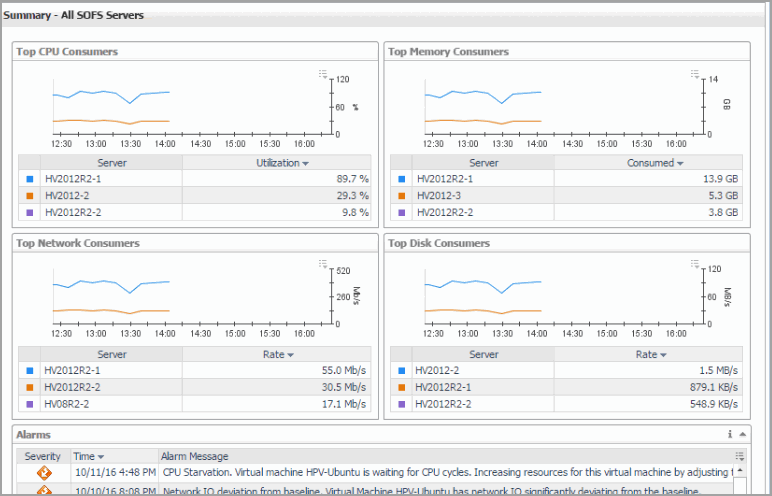
The Summary - All SOFS Servers view displays overall resource utilization information for a group of SOFS servers and shows the elements that consume the highest amount of system resources.
This view appears in the Quick-View on the left when you select All SOFS Servers in the SOFS Servers view.
Table 31. Alarms
Alarm Message. An explanation about why the alarm occurred.
Severity. Indicates the alarm severity: Warning, Critical, or Fatal.
Time. The time at which the alarm was generated.
Severity. Displays the Alarm dialog box, showing additional information about the alarm. For more information about alarms in Foglight, see the Foglight User Help.
Figure 58. Alarm dialog box
Servers. The name of the server.
CPU Utilization.The total percentage of CPU utilization the top three CPU consumers spend on executing system code and user programs, during the selected time range.
CPU Utilization (in the graph). Displays the Top Servers-CPU Utilization dialog box.
Figure 59. Top Servers - CPU Utilization dialog box
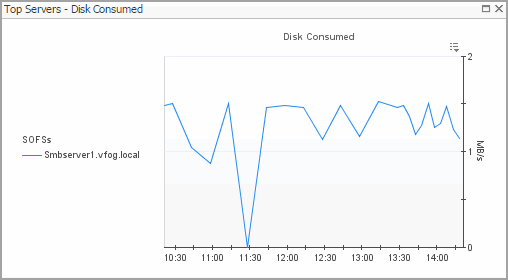
Disk Transfer Rate. The rate at which the top three disk consumers read or write data to the disk during the selected time range.
Servers. The name of the server.
Disk Transfer Rate (in the graph). Displays the Top Servers - Disk Transfer Rate dialog box.
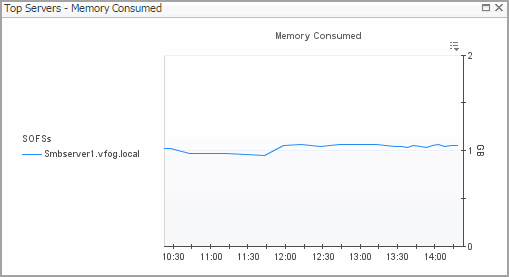
Memory Consumed. The amount of memory the top three memory consumers use during the selected time range.
Servers. The name of the server that are the top three memory consumers.
Memory Consumed. Displays the Top Servers - Memory Consumed dialog box.
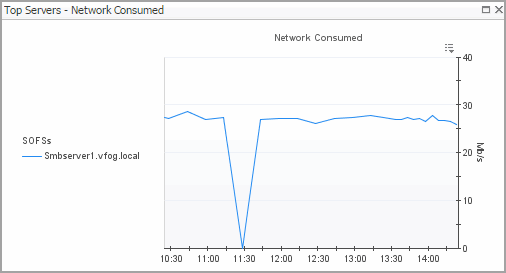
Network Transfer Rate. The rate at which the top three network consumers transfer data to or from the network during the selected time range.
Servers. The name of the server that are the top three network consumers.
Network Transfer Rate. Displays the Top Servers - Network Transfer Rate dialog box.

SOFS Server Summary view

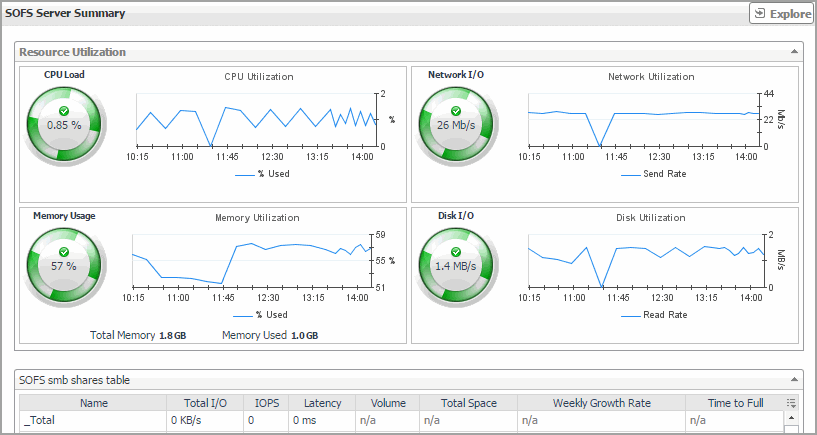
The SOFS Server Summary view shows the overall resource utilization and the amounts of system resource consumption for an SOFS server.
This view appears in the Quick-View on the left when you select an SOFS server in the SOFS Servers view.
Figure 63. Server Summary view
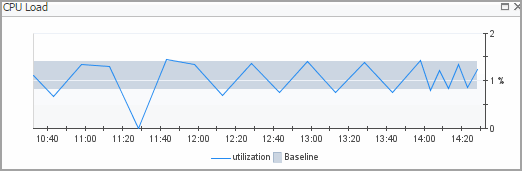
CPU Load. The current percentage of the selected server’s CPU load, used to execute system code and user programs, based on the total CPU capacity.
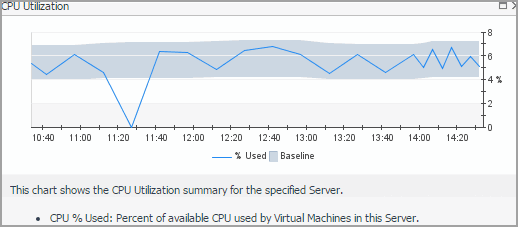
CPU Utilization, % Used. The percentage of the server’s CPU utilization spent on executing system code and user programs during the selected time period.
CPU Utilization, Baseline. An envelope indicating the expected CPU utilization range based on historical data.
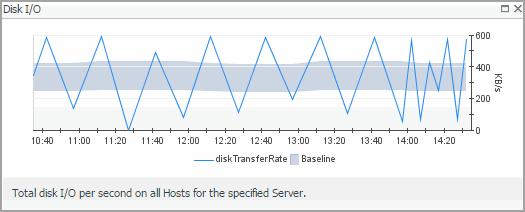
Disk I/O. The current disk I/O rate for the selected server.
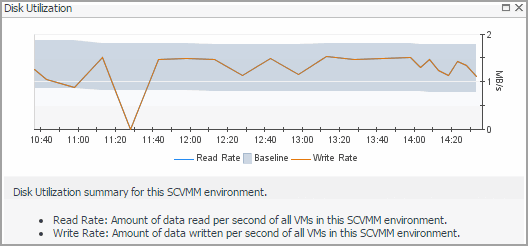
Disk Utilization, Baseline. An envelope indicating the expected disk utilization range based on historical data.
Disk Utilization, Transfer Rate. The rate at which the server reads and writes data to the disk during the selected time period.
Memory Usage. The current percentage of the average memory usage by the selected server, based on the total memory capacity.
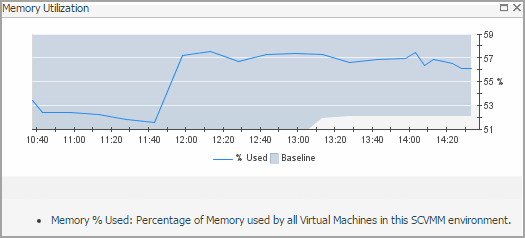
Memory Utilization, % Used. The percentage of the available memory that the server uses during the selected time period.
Memory Utilization, Baseline. An envelope indicating the expected memory utilization range based on historical data.
Network I/O. The current rate at which the selected server transfers data from and to the network.
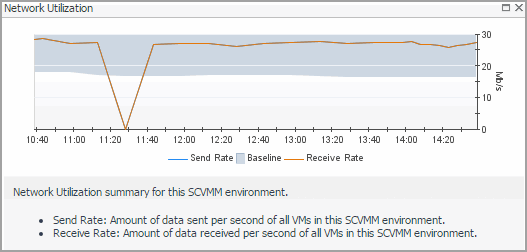
Network Utilization, Baseline. An envelope indicating the expected network utilization range based on historical data.
Network Utilization, Transfer Rate. The rate at which the selected server transfers data from and to the network during the selected time period.
CPU Load spinner. Displays the CPU Load dialog box.
Figure 64. CPU Load dialog box
CPU Utilization graph. Displays the CPU Utilization dialog box.
Figure 65. CPU Utilization dialog box
Disk I/O spinner. Displays the Disk I/O dialog box.
Figure 66. Disk I/O dialog box
Disk Utilization graph. Displays the Disk Utilization dialog box.
Figure 67. Disk Utilization dialog box
Memory Usage spinner. Displays the Memory Usage dialog box.
Figure 68. Memory Usage dialog box
Memory Utilization graph. Displays the Memory Utilization dialog box.
Figure 69. Memory Utilization dialog box
Network I/O spinner. Displays the Network I/O dialog box.
Figure 70. Network I/O dialog box
Network Utilization graph. Displays the Network Utilization dialog box.
Figure 71. Network Utilization dialog box
Related Documents

The document was helpful.

Select Rating

I easily found the information I needed.

Select Rating