Submitting forms on the support site are temporary unavailable for schedule maintenance. If you need immediate assistance please contact technical support. We apologize for the inconvenience.
Sometimes when PXE booting to the KBE in order to capture a system image, the main partition is not mapped to C drive.
원인
This issue is not related to the KBE, Windows determines how the partitions are mapped.
해결 방안
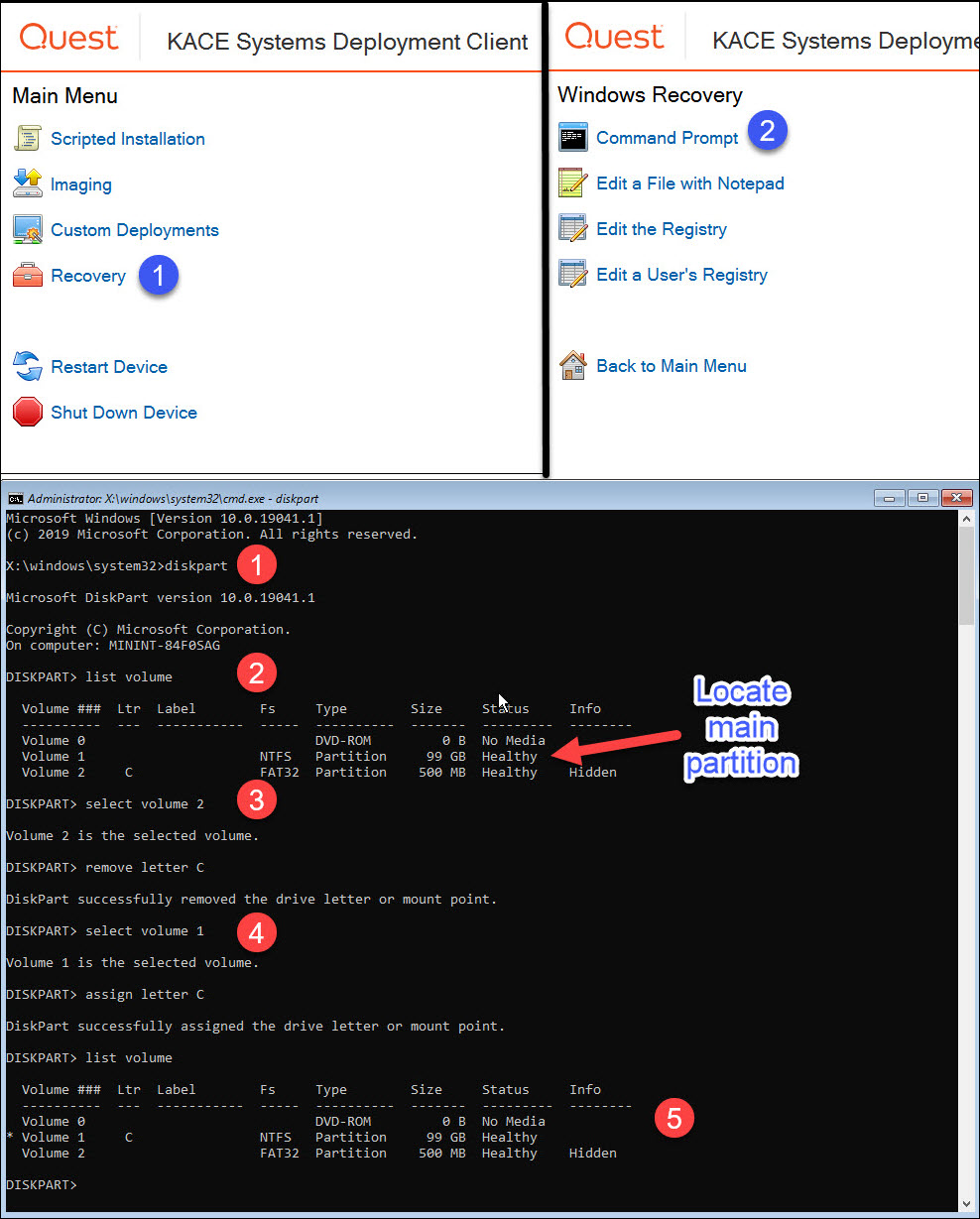
To properly remap the drive letter using CMD use the built-in tool "DISKPART" detailed in the instructions below:
Boot to the KBE, and from the Main Menu go to Recovery | Command Prompt and type the command diskpart
Then enter the command list volume and press Enter. Locate the main partition where C drive should be mapped.
Type command select volume X (where X is the number of the partition to be modified) and press Enter. For this example, we chose the partition 2 which had the C drive improperly mapped, then ran the command remove letter C
Select the main partition and properly map the drive letter as needed. For this example, we had to run the command select drive 1 for the main partition, then ran the command assing letter C
Run list volume command again to make sure the main partition was properly mapped.