Sometimes when PXE booting to the KBE in order to capture a system image, the main partition is not mapped to C drive.
原因
This issue is not related to the KBE, Windows determines how the partitions are mapped.
解决办法
To properly remap the drive letter using CMD use the built-in tool "DISKPART" detailed in the instructions below:
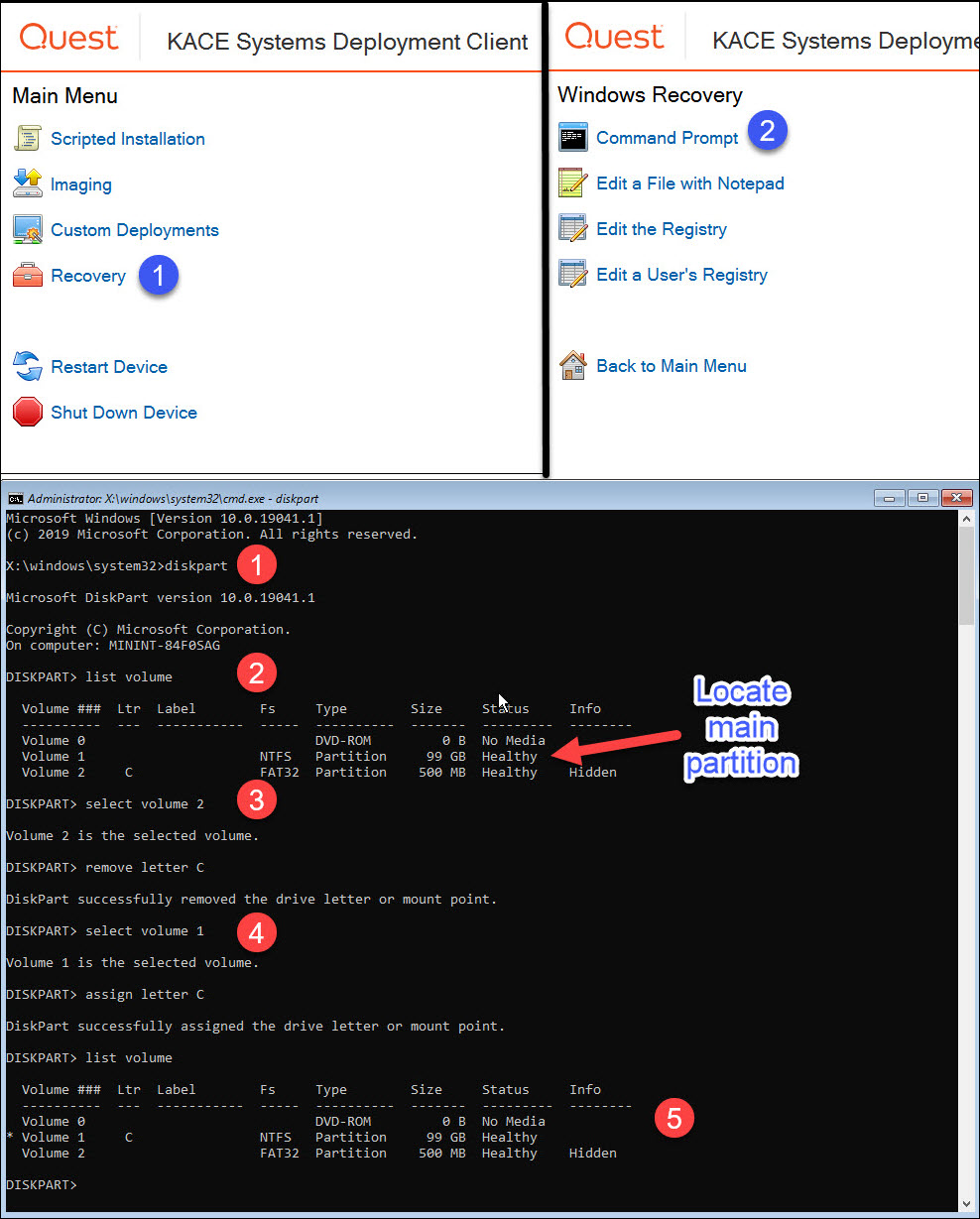
Boot to the KBE, and from the Main Menu go to Recovery | Command Prompt and type the command diskpart
Then enter the command list volume and press Enter. Locate the main partition where C drive should be mapped.
Type command select volume X (where X is the number of the partition to be modified) and press Enter. For this example, we chose the partition 2 which had the C drive improperly mapped, then ran the command remove letter C
Select the main partition and properly map the drive letter as needed. For this example, we had to run the command select drive 1 for the main partition, then ran the command assing letter C
Run list volume command again to make sure the main partition was properly mapped.