立即与支持人员聊天
与支持团队交流

Foglight Integration for OpenManage Essentials 5.7.0 - User Guide

Introducing Foglight Integration for OpenManage Essentials

Dell Foglight™ Integration for OpenManage Essentials enables you to view the detailed hardware data that OpenManage Essentials collects about your ESX servers in the Foglight for Virtualization Enterprise Edition dashboards. This powerful combination provides you with a single-pane-of-glass to monitor your ESX servers within your entire monitored environment - so you can quickly diagnose issues from the symptom to the root cause and resolution. By offering this comprehensive visibility into your monitored environment, Foglight helps ensure that cross-functional teams collaborate on and prioritize issues that matter most to businesses.

Understanding the components

VMware®vCenter® is the only virtualization management tool that is supported for Foglight Integration for OpenManage Essentials. After the integration, you can discover the ESX servers from vCenter that are monitored in OpenManage Essentials and Foglight for Virtualization EE. If the ESX server is monitored by both products, it displays in the Foglight for Virtualization EE dashboards.

Integration Agent Installation

Installing the integration agent

2
On the navigation panel, under Homes, select Environment Overview.
4
On the Select an Agent Host page, choose the host for the new OME Agent. This is a host where you have an existing Foglight Agent Manager installed.
5
On the Select OME Server page, type the name of the OME Server. The default port number for the OME server is 2607.
6
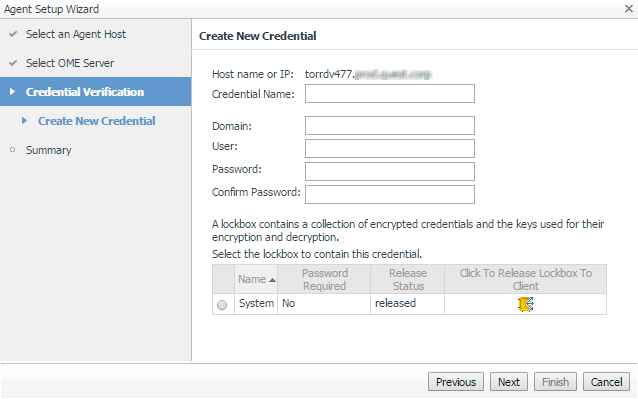
On the Credential Verification page, choose to add the host to a new or existing credential.
a
On the Create New Credential page, type the required information.
Credential Name: Any name that you want to call this credential.
Domain: Required only if it is configured for your host.
User: The user name for this credential.
Password: A password for the user.
a
On the Select Existing Credential page, chose the credential.
8
On the Summary page, review your settings.
9
Click Finish to complete the integration.
自助服务工具
知识库
通知和警报
产品支持
下载软件
技术说明文件
用户论坛
视频教程
RSS订阅源
联系我们
获得许可 帮助
技术支持
查看全部
相关文档

The document was helpful.

选择评级

I easily found the information I needed.

选择评级