暂时无法在支持网站上提交享有定期维护的产品表单。 如果您需要我们立即提供帮助,请与技术支持部门联系。 对于由此给您带来的不便,我们深表歉意。
获得即时帮助
完成注册
登录
请求定价
联系销售人员
您已选择一个产品捆绑包。 您能否选择单个产品以便我们更好地满足您的请求。 *
技术支持工程师目前正忙,无法回应您的消息。 如果需要即时服务,请通过我们的服务请求表提交请求。
以下文章可根据您的描述解决您的问题。
When Collaboration Services creates a stub object, it verifies that no other object with the same address exists in the forest by querying the nearest Global Catalog. If the object already exists, Collaboration Services can take any of the following actions:
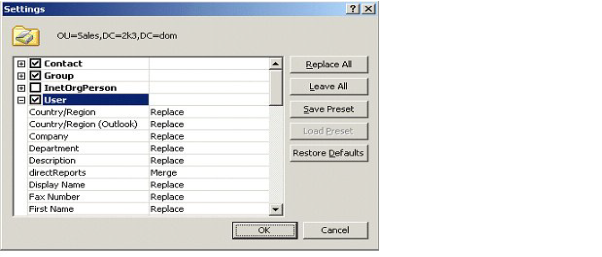
When configuring the matching, you can choose the attribute synchronization direction on a per-attribute basis, so some or all attributes are synchronized from the published object to the object you are matching into. Attribute synchronization is useful if the user account is updated by the provisioning system in one of the forests and these changes need to be propagated to the same user’s accounts in other forests.
If you have active user accounts of the same user in multiple forests but do not want to use matching for some reason, you can do one of the following:
There can be other conflicts that are not detected and resolved by Collaboration Services automatically because the conflicting objects do not cause technical issues, but can confuse the end users. Examples include:
After you decide how conflicts will be resolved in each forest, you can plan the Collaboration Services configuration. The main decision will be which forest should serve as the headquarters (HQ) for Collaboration Services synchronization. Only one HQ forest can be set up in a Collaboration Services environment.
Consider the following criteria when selecting the HQ forest:
To increase synchronization performance and reduce network traffic and HQ server load, choose the forest containing the most data to be synchronized.
The HQ forest processes all synchronized data from all synchronization partners. Therefore, there is a higher data processing load on the HQ Collaboration Services server, which means higher hardware requirements.
The HQ forest administrator will be a key person to help other partners in tuning performance and troubleshooting problems for the whole Collaboration Services structure.
You must also consider how you will form object collections. This decision may require additional environment preparation. Collaboration Services allows both explicit and dynamic object selection.
Dynamic object selection may be based on the following:
Decide if you need mappers to customize Collaboration Services synchronization. For example, consider using mappers if:
您可以在附属支持站点上查找适用于戴尔*产品*的在线支持帮助。单击“继续”,转至适用于*产品*的正确支持内容和帮助。
The document was helpful.
选择评级
I easily found the information I needed.
Quest Software门户不再支持IE 8、9和10,建议将您的浏览器升级到最新版本的Internet Explorer或Chrome。
要升级到IE 11,请单击此处
要升级到Chrome,请单击此处
如果继续使用IE 8、9和10,您将无法充分利用我们所有出色的自助服务功能。