
Retention is not executed. Older Savepoints are not purged per retention settings.
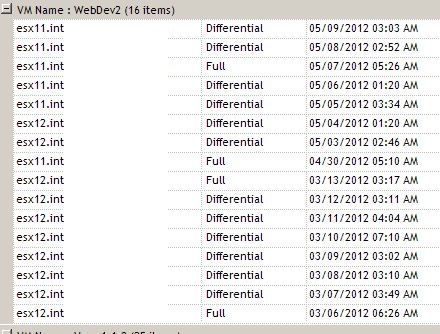
Customer is complaining that Ranger absolutely ignores SPs created between 03/06 and 03/12.
Job settings are: 7 savepoints, Differential type, threshold - 6.
There are few different possible problems, one of them is rather rare - broken link between BackupTask and Savepoint tables (http://communities.quest.com/thread/10839?tstart=0).
Another issue could be when a VM is removed (by whatever means) from the vRanger inventory. This will break the savepoint chain, which in turn, will never meet its retire/expiration date.
In addition, re-creating a job, will also create a new savepoint chain, thus, the original will remain because it will never complete.
In this particular case older savepoints ignored by Ranger were created by another job that has been deleted since.
Note. One backup job is not aware of any savepoints created by another backup job for the same VM. Both jobs keep own pools of savepoints and execute retention according to the job retention settings.
Run following T-SQL script against Ranger DB to find out what job/jobs (TemplateId) created each existing savepoint for this VM. Replace <VM_name> with actual VM name.
-- script begin
use vRangerPro
select s.VmName, s.StartTime, s.RepositoryId, tv.Name, t.* from SavePoint s
inner join BackupTask bk on bk.SavePointId = s.SavePointId
inner join Task k on k.TaskId = bk.TaskId
inner join Job j on j.JobId = k.JobId
inner join TemplateVersion tv on tv.TemplateVersionId = j.TemplateVersionId
inner join Template t on t.TemplateId = tv.TemplateId
where s.VmName = '<VM_name>' and s.IsDeleted = 0
order by j.StartTime
--script end

Check 2 Backup Templates. 6BFC91EE-2893-4DEC-97DE-88D17BEC2C46 (Backup Daily) has been deleted (last column). E3AAD3D6-F02C-463A-9C33-517C7C83D161 (Backup 'Prod_1') is an active one and executing retention (on its own SP pool) properly.
Note. Do not pay much attention to the Template Name. Ranger allows duplicate job name. TemplateId is critical since GUID is in use.