Chatta subito con l'assistenza
Chat con il supporto

Foglight for Hyper-V 5.7.0 - User and Reference Guide

About Foglight for Hyper-V Agent administration Performance monitoring with the Hyper-V Environment dashboard Performance investigation with the Hyper-V Explorer Foglight for Hyper-V alarms Appendix: Hyper-V Agent error codes

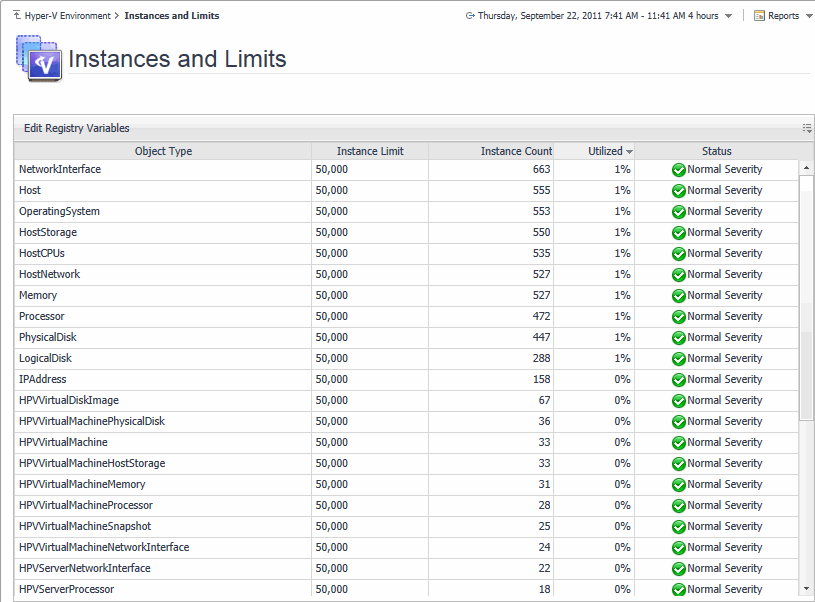
Instances and Limits view

Instance Count. The current number of object instances of this type.
Instance Limit. The maximum number of object instances of this type that can be instantiated.
Object Type. The type of the topology object.
Status. The current status representing the highest severity level associated with an instance of that type.
Utilized. The percentage of the object limit instance that is currently utilized.

Performance monitoring with the Hyper-V Environment dashboard

Accessing the Hyper-V Environment dashboard

When you navigate to the Hyper-V Environment dashboard for the first time, the Monitoring tab appears open. This tab provides an overall summary of your virtual environment.
3
On the navigation panel, under Homes, click Hyper-V Environment.
4
Select the Clusters, Servers, or Virtual Machines tile from the top left.

Monitoring tab

Figure 40. Monitoring tab
Related Documents

The document was helpful.

Seleziona valutazione

I easily found the information I needed.

Seleziona valutazione