The information in this article applies to:
File System Auditor Version 2.53
HOW TO:
Manually purge the database using a stored procedure within SQL Management Studio
When attempting to purge a large amount of events from the File System Auditor database via the Purge Audit Log function, the purge can take a long time, appear to be stuck, or give an error such as “The DELETE statement conflict with the REFERENCE constraint “FK_tblAuditLog_tblCLientComputer”, as shown below:

As an alternative, the dbo.PurgeDataByDate stored procedure within SQL Management can be used.
IMPORTANT: Always make a backup of the database before purging data!
Note: Using the stored procedure will delete all events prior to a certain date.
To use the Stored Procedure for purging events, open the SQL Management Studio and expand the File System Auditor database. The default database name is SLFileAuditor. Expand Programmability | Stored Procedures:
![[image]](https://support.quest.com/KBArticleImages/SL3861/36bcac41.jpg)
Right click the dbo.PurgeDataByDate stored procedure and select “Execute Stored Procedure”.
![[image]](https://support.quest.com/KBArticleImages/SL3861/65c3756f.jpg)
Enter a date in the “Value” field. In the example below, any events that occurred prior to 07/21/2011 will be purged. Click “OK”.

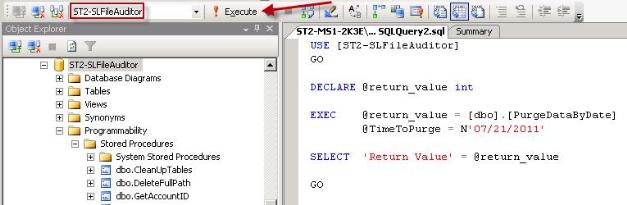
IMPORTANT: Verify that the File System Auditor database is selected and then “Execute” the query: