ApexSQL Log is a tool which allows you to view transaction log and audit, revert, or replay data and object changes that have affected a SQL database including those that had occurred before it was installed. It restores damaged or missing data and objects and also captures information on the user, application, and host that made those changes.
There are several ways to create and maintain an audit trail using ApexSQL Log. The transaction log information and operation details can be exported to the following formats:
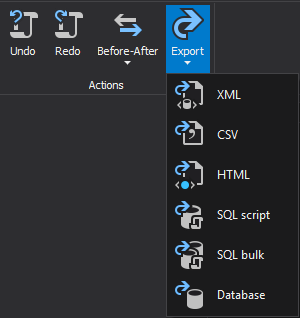
The SQL Script option will generate a SQL script which will insert the transaction information and operation details into two custom ApexSQL Log’s tables.
The BULK INSERT export method generates a SQL script that utilizes the BULK INSERT method for importing data into the same custom ApexSQL Log’s tables used in SQL Script export option.
The purpose of SQL Script and SQL Bulk exporting is to allow importing of audited operations into a user database for further processing, custom reporting and analysis. SQL script will insert all audited operations and their details into two tables:
However, for large volumes of audited data this method is very slow because each operation is inserted separately. To overcome this problem, ApexSQL Log offers the BULK export option.
SQL BULK will create all files necessary for importing audited operations into ApexSQL Log tables through the BULK INSERT command. This format will allow you to process large volumes of information more quickly than the standard INSERT method. Unlike other options that produce just one file, the BULK INSERT option produces three files:
Alongside SQL BULK INSERT script user can choose between these standard reports:
ApexSQL Log will export results directly to the database of user’s choice, pumping the data into two specific tables where auditing results will be stored and can be accessed or queried at any time via SQL Server Management Studio or any other similar tool. This option is similar to the SQL Script and SQL BULK options, but instead of creating SQL Scripts, auditing results are directly inserted into the table
A CSV export file can be read by Microsoft Excel and Microsoft SQL Server Enterprise Manager. This format is often used to exchange data between similar applications that are commonly used to create spreadsheets.
The HTML option will generate an HTML report containing all transaction information and operation details, which can be easily viewed in a web browser.
A generated XML file can be sent to a custom application for post-processing. This is how ApexSQL Log actually generates HTML reports – by exporting data to XML and then converting it to HTML.
Creating and maintaining an auditing trail can be fully automated by leveraging the command line interface (CLI). Stay tuned for the next article, and learn more about how to automate daily reporting with ApexSQL Log

