After mounting a recovery point containing a Microsoft Exchange database, the database reports a “Dirty Shutdown” status. This is verified by running the ESEUTIL /MH command on the database.
This can include the next error while using MailboxRestore:
Error attaching database, error type: ESE, code: -550

JET_errDatabaseDirtyShutdown, Database was not shutdown cleanly. Recovery must first be run to properly complete database operations for the previous shutdown. Error during working with session in function AddSession
This behavior is expected. A "Dirty Shutdown" occurs when transaction logs have not been committed to the database. Exchange databases utilize transaction logs for write operations, which are later committed to the database during normal operations. If the Microsoft Exchange Information Store service is stopped abruptly or if the database is improperly shut down, the database will remain in a "Dirty Shutdown" state until those logs are replayed or repaired.
Understand the Behavior:
A Dirty Shutdown state occurs under the following conditions:
Transaction logs remain uncommitted due to an abrupt shutdown.
Volume Shadow Copy Service (VSS) snapshots capture the database and transaction logs in their current state, resulting in uncommitted logs.
In most cases, Exchange will replay the transaction logs and return the database to a Clean Shutdown state upon remounting the database.
Steps to Resolve the Dirty Shutdown State:
Option 1: Use Rapid Recovery Mail Restore Utility
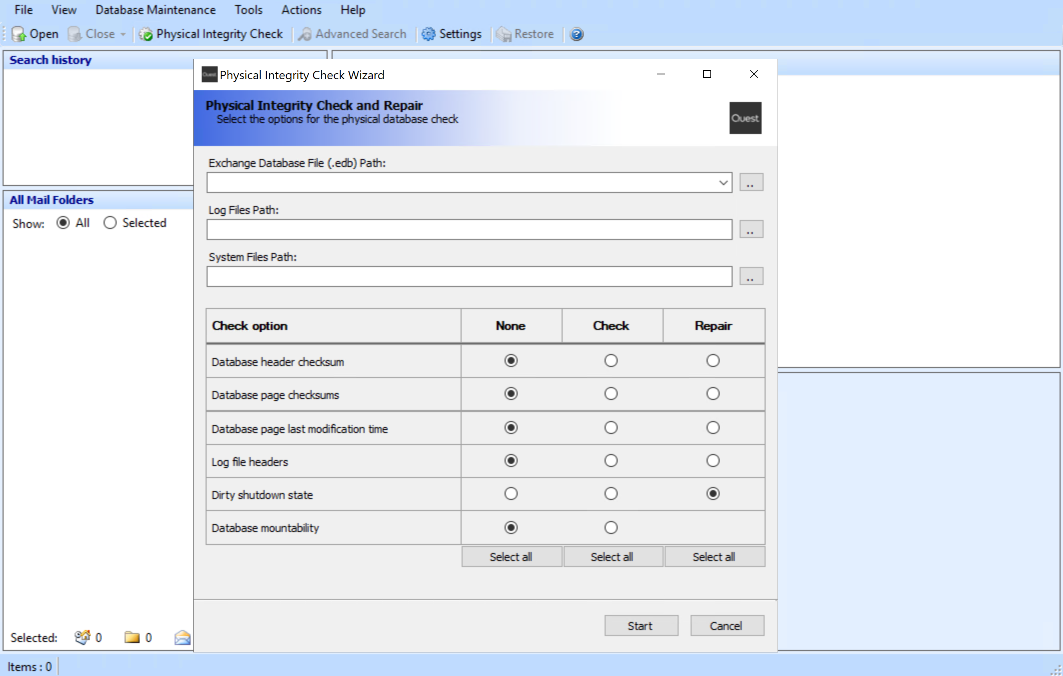
Use the Physical Integrity Check option in the Mail Restore utility.
Select "Dirty Shutdown State" to transition the database to a Clean Shutdown state.
Option 2: Manual Repair Using Eseutil
Use the Eseutil command-line tool to manually repair the database:
Important Note: These commands should only be executed on the Exchange database and logs located in the Rapid Recovery mount point, not on the production environment.
Check the database state:
eseutil /mh "C:\Path\To\Database.edb"Look for "State" in the output.
Perform a soft recovery to replay logs:
eseutil /r Enn /l "C:\Path\To\LogFiles" /d "C:\Path\To\Database.edb"Replace Enn with the appropriate log prefix (e.g., E00).
Verify the database state again. If still in Dirty Shutdown, proceed to a hard repair.
Perform a hard repair (if necessary):
eseutil /p "C:\Path\To\Database.edb"Caution: A hard repair may result in data loss within the mounted backup database. Ensure you are working only on the backup copy in the Rapid Recovery mount point and not on a production database.

