On Demand Migration Current - Security Guide - Active Directory

Introduction

Managing information system security is a priority for every organization. In fact, the level of security provided by software vendors has become a differentiating factor for IT purchase decisions. Quest strives to meet standards designed to provide its customers with their desired level of security as it relates to privacy, confidentiality, integrity, and availability.

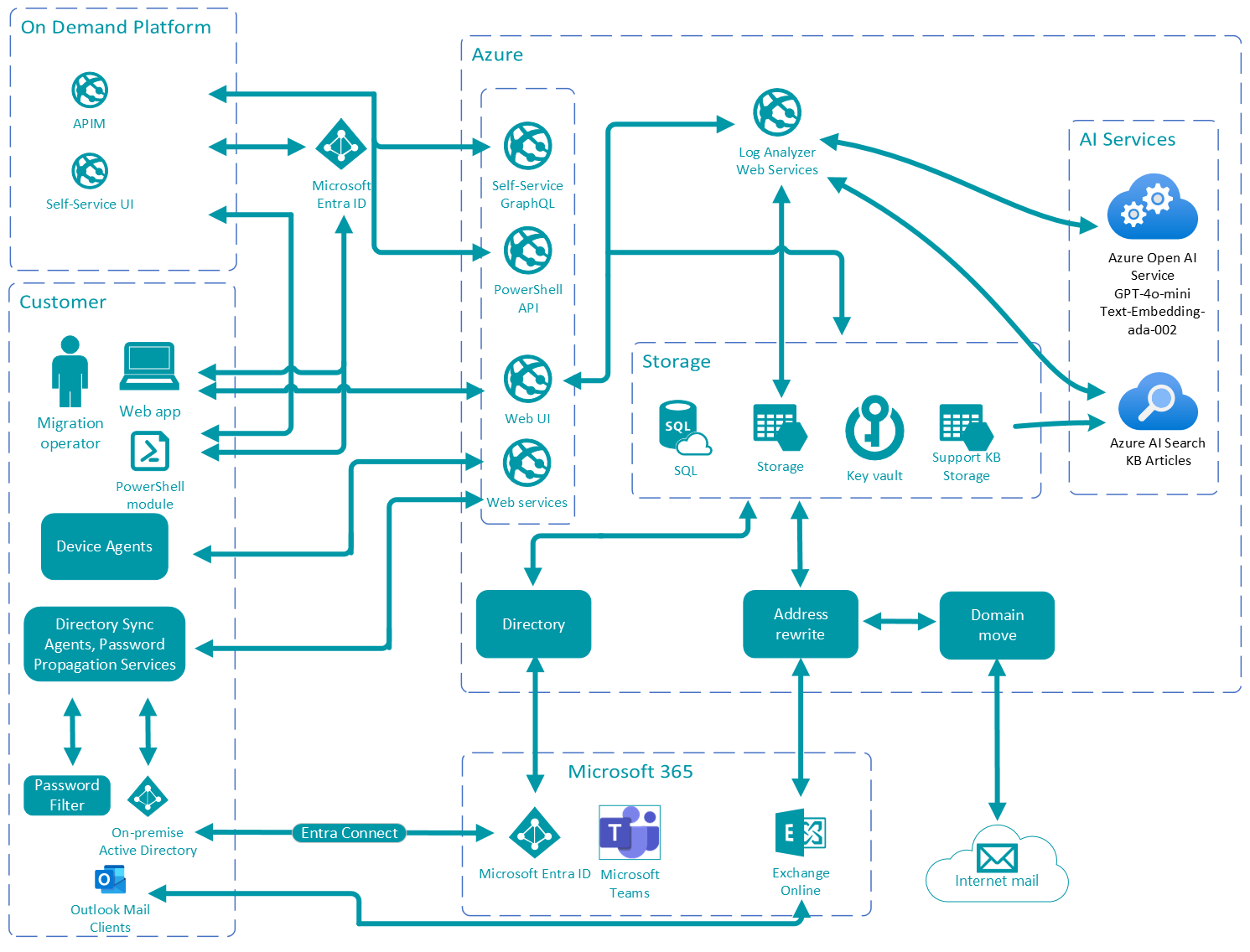
This document describes the security features of Quest On Demand Migration for Active Directory (ODMAD). It reviews access control, protection of customer data, secure network communication, cryptographic standards and more.

About On Demand Migration for Active Directory (ODMAD)

ODMAD provides the following functionality:

  • Full tenant discovery of users, groups, domains and more.
  • Move domains between tenants.
  • Synchronize Active Directory and Microsoft Entra ID directories with customizable workflows.
  • Migrate workstations, computers, servers, objects, users, groups and more.
  • No servers, trusts, or network connectivity required.
  • Data transformation and customizable mapping of directory attributes.
  • Near-real time password hash synchronization.
  • Password change propagation.
  • Trustless SID History migration.
  • AI-Powered Migration Assistant

For details about security in ODM, see the document On Demand Migration Current - Security Guide - General Migration.

ODM provides the following functionality in a robust project management interface with in-depth monitoring and reporting:

  • Analyzes Microsoft Entra ID structure and highlights the problems that might adversely affect the migration.
  • Migrates users, groups, and the related information between Microsoft Entra ID tenants or maps the existing source/target accounts.
  • Migrates hybrid accounts (on-premises users/groups synchronized with Microsoft Entra ID).
  • Migrates Microsoft Office 365 mailboxes.
  • Automatically redirects on-premise Outlook clients to the new Exchange Online.
  • Grants access to the source tenant’s resources and applications for the migrated/mapped accounts.
  • Transfers OneDrive for Business content and permissions between tenants.
  • Ensures uninterrupted workflows during the migration:
    • Automatically replaces email addresses in outgoing and incoming messages, as if the senders have already been migrated to the target tenant (Domain Coexistence feature) .
    • Shares free/busy information between tenants.

Architecture Overview


Azure Datacenter Security

Microsoft Azure datacenters have the highest possible physical security and are considered among the most secure datacenters in the world. They are subject to regular audits and certifications including Service Organization Controls (SOC) 1, SOC 2 and ISO/IEC 27001:2005. Relevant references with additional information about the Windows Azure datacenter security can be found here:

Self Service Tools
Knowledge Base
Notifications & Alerts
Product Support
Software Downloads
Technical Documentation
User Forums
Video Tutorials
RSS Feed
Contact Us
Licensing Assistance
Technical Support
View All
Related Documents

The document was helpful.

Select Rating

I easily found the information I needed.

Select Rating