
|
• |
|
• |
|
• |
|
• |
|
• |
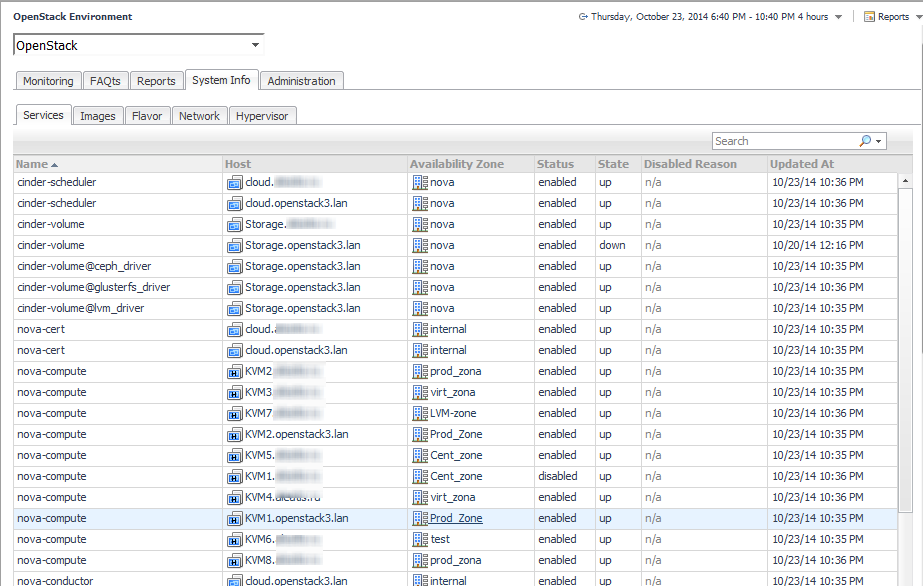
Name — the name of a service installed on the OpenStack system. |
|
• |
Host — the node on which the service is installed. |
|
• |
Availability Zone — the location where the node resides. |
|
• |
Status — indicates if the service is enabled. |
|
• |
State — indicates if the service is running. |
|
• |
Disabled Reason — provides a description of why a service is disabled. |
|
• |
Updated at — provides the time the configuration information was last refreshed. |
|
• |
Name — the name of the image. |
|
• |
Size — the size of image data, in gigabytes. |
|
• |
Visibility — indicates if the image is accessible to all members of a project. |
|
• |
Min Disk — the minimum size of the disk needed to boot the image, in gigabytes. |
|
• |
Min Ram — the minimum amount of RAM needed to boot the image, in megabytes. |
|
• |
Description — is a brief description of the image. |
|
• |
Name — name of an individual flavor. |
|
• |
RAM — virtual machine memory in megabytes. |
|
• |
vCpus — number of virtual CPUs presented to the instance. |
|
• |
Swap — optional swap space allocation for the instance. |
|
• |
rxtxFactor — optional property that allows created servers to have a different bandwidth cap from that defined in the network. |
|
• |
Disk — Virtual root disk size in gigabytes. |
|
• |
Disabled — Default value is false. |
|
• |
Public — whether a flavor is available to all users or private with True being the default. |
|
• |
Ephemeral — the size of a secondary ephemeral data disk that exists only for the life of the instance. |
|
• |
ExtraSpec — additional optional restrictions on which compute nodes the flavor can run on. |
|
• |
Name — network name. |
|
• |
Status — indicates if the network is operational. |
|
• |
Subnets — subnets associated with the network. |
|
• |
PhysicalNetwork — the name of the physical network. |
|
• |
AdminStateUp — the administrative state of a port. |
|
NOTE: false indicates that the port is not forwarding packets. |
|
• |
Project — project to which the network is associated. |
|
• |
NetworkType — the default network provider type and the only type of network projects are able to create. |
|
• |
External — indicates if the network is public or private. |
|
• |
Shared — whether the network resource can be accessed by any project or not. |
|
• |
SegmentationId — identifies an isolated segment on the physical network. |
|
• |
Hypervisor Type — the type of hypervisor running on a host. |
|
• |
Host — the host running the hypervisor. |
|
• |
Node Name — name of the hypervisor node. |
|
• |
Node Ip — hypervisor’s IP, available for “Icehouse” and higher versions of OpenStack. |
|
• |
Hypervisor Version — the version of the hypervisor running on a host. |
|
• |
VCPUs — the total number of virtual central processing units (VCPUs). |
|
• |
RAM — hypervisor’s RAM. |
|
• |
Storage — hypervisor’s local storage capacity. |
 |
|
 |
|
 |
|
 |
|
 |
|
 |
|
 |


