
-
Title
Update Migration Agent with Auto Update Feature -
Description
Update Migration Agent with Auto Update Feature -
Resolution
PST FlightDeck comes with a feature called Auto Update. It allows updated versions of the Migration Agent to be pushed to workstations.
Steps
You have to create packages for AutoUpdate. There are two versions of the Migration Agent; therefore, there are two versions of AutoUpdate package: x86 and x64 (different bitness).
- Install the latest version of the Migration Agent on some workstations. Bitness of Migration Agent is determined by bitness of installed Outlook. These workstation doesn’t need to be involved in PST migration.
- Prepare the packages for Auto Update. The auto update package is a small .zip file that contains the files which will be replaced in target workstation.
- Select following files from installation on step 1. The package should contain the following files:
BitsTester.exeCopyClientInterfaceLib.dllhandle.exeIndependentsoft.Pst.dllInterop.ProfMan.dllInterop.Redemption.dllLinqBridge.dlllist.txtMigrationAgent.exeNLog.dllOverrideLibrary.dllProfMan64.dllPSTCopyWebServiceConnector.dllPSTCopyWebServiceConnector.XmlSerializers.dllPSTCoreLibrary.dllPSTLimitBits.exePSTLocalDbStore.dllPSTSnapshotTask.exeRedemption64.dllRedemptionWrapper.dllResetMigrationAgent.exeSharpBITS.Base.dllSmartThreadPool.dllSQLite.Interop.dllSystem.Data.SQLite.dll - Zip the folder and name the folder “AutoUpdate.zip” to update the 32-bit Migration Agent or “AutoUpdate_64.zip” to update the 64-bit Migration Agent. Make sure there are no directories within the zipped folder and the files are directly within the zip.
- Place the zipped folder into the web service directory – C:\Program Files\QUADROtech\PST FlightDeck\Core WebService\

- Create a new profile in PST FlightDeck and a new Migration Agent config. This way you will have new profile for users for which you want to execute Auto Update.

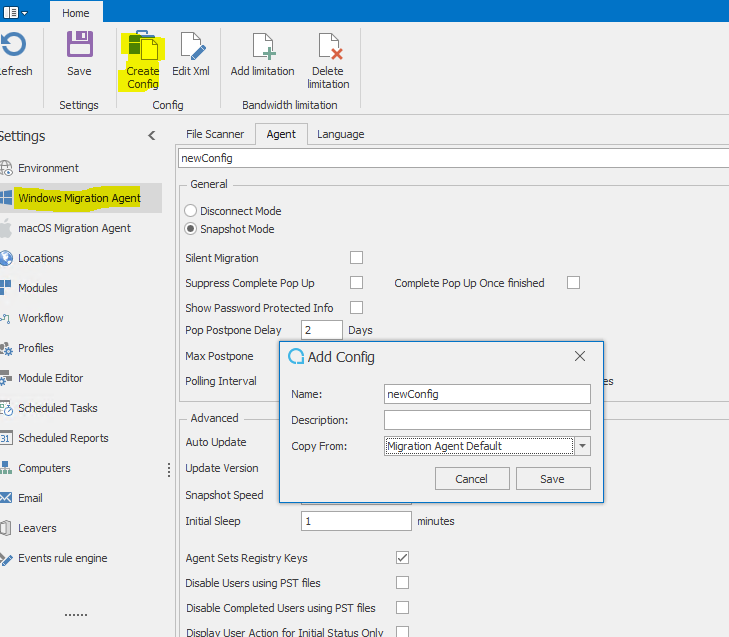
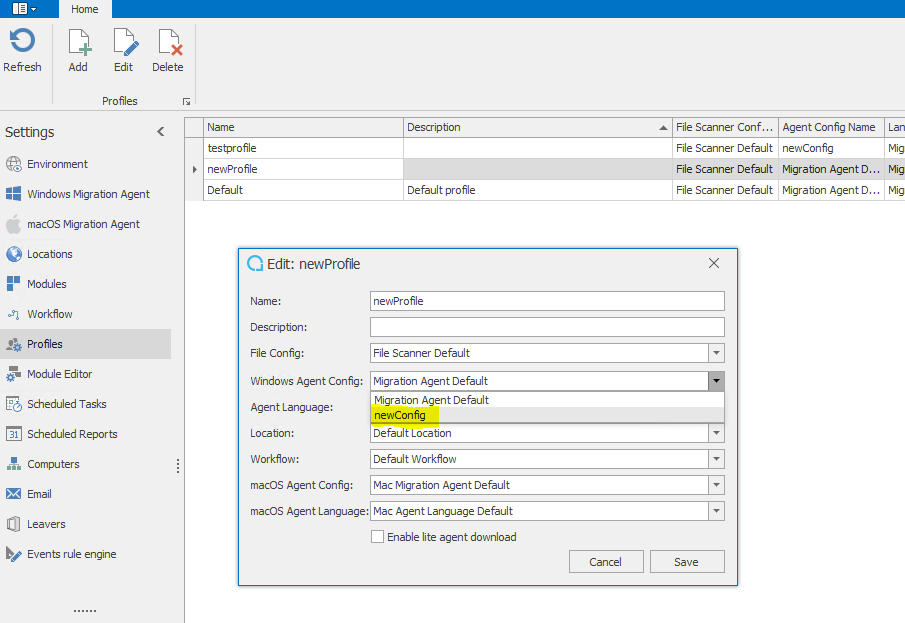
- Choose a test user and assign him to the new profile. Please note, Auto Update needs to be enabled. The exact update version of the package also needs to be entered. The update begins when the Migration Agent downloads the new config from the server.

Troubleshooting
The Migration Agent log will show this message when the update is in progress:
Info|3|ClientCopyCore|ExecutingProcess.CheckConfigUpdate
=> ExecutingProcess.UpdateConfig => LoggerImpl.Write|Different
auto update version available: 7.2.57410.01, current: 6.2.3921.01
Info|3|ClientCopyCore|ExecutingProcess.CheckConfigUpdate
=> ExecutingProcess.UpdateConfig => LoggerImpl.Write|Waiting for
update max 10 minutes. After this period client will not start
automatically
Info|3|ClientCopyCore|ExecutingProcess.CheckConfigUpdate
=> ExecutingProcess.UpdateConfig => LoggerImpl.Write|Restarting
client and file scanner in 30 seconds
Info|3|ClientCopyCore|ExecutingProcess.CheckConfigUpdate
=> ExecutingProcess.UpdateConfig => LoggerImpl.Write|/C echo
Updating Migration client. Please wait! & ping -n 30 127.0.0.1 >
nul & START MigrationAgent.exe & START FileScanner.exe
If the update is successful, this will show this in the log:Info|1|ClientCopyCore|Program.Main => Program.MainImpl => LoggerImpl.Write|Build: 7.2.57410.01
If it failed, the old version of the migration agent will still show up. The default location is: C:\Windows\Temp\Quadrotech\MigrationAgent.logNote
Be aware of bitness. The correct version needs to be installed for the agent to work. The next time the agent runs, it checks if it has the latest version and tries to update if it is not current.