지금 지원 담당자와 채팅
지원 담당자와 채팅

Foglight for Java EE Technologies 5.9.9 - Installation Guide

Install and Configure Foglight for Java EE Technologies Integrate with JBoss Integrate with Apache Tomcat Integrate with WebLogic Domain Startup Scripts Integrate with WebSphere Integrate with Oracle AS Create a Generic Installation for Manual Java EE Agent Integration Manage Java EE Agent Installations, Integrations, and Configurations Managing Java EE Agent Configurations Java EE Installation Management Java EE Integration Configuration FAQ and Troubleshooting Manual Application Server Integrations AppendixB: Managing Permissions for the Java EE Integration Agent Appendix A: Java EE Application Methods

Setting the Maximum Request Fragment cache size

In the period between requests, the Java EE agent caches the data structures used to collect the data for request fragments. The MaxRequestFragmentCacheSize setting determines the maximum number of request fragments that are stored in the cache. The default value is 50. Set the value to zero (0) to disable the cache.
1
Click the Requests tab of the Edit dialog box.
2
Type a value in the MaxRequestFragmentCacheSize box.
3
Click Save.
If you manually edit the instrumentation.config file, use the following syntax to specify the maximum request fragment cache size.

Setting the Request Recursion Limit

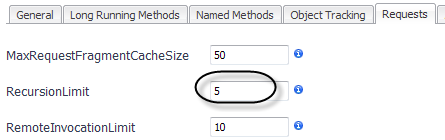
The RecursionLimit configuration setting adjusts the number of recursive calls for which the Java EE agent collects detailed performance information. Beyond this number, the Java EE agent collects and aggregates timing information for the entire recursive sequence.
1
Click the Requests tab of the Edit dialog box.
2
Type a value in the RecursionLimit box.
3
Click Save.
If you manually edit the instrumentation.config file, use the following syntax to specify the recursion limit.

Setting the Request Remote Invocation Limit

The RemoteInvocationLimit determines the maximum number of calls that the Java EE agent follows from a single method to a remote system. Beyond this number, the Java EE agent only collects and aggregates overall performance information for the remote system invocations. This is done for two reasons:
1
Click the Requests tab of the Edit dialog box.
2
Type a value in the RemoteInvocationLimit box.
3
Click Save.
If you manually edit the instrumentation.config file, use the following syntax to specify the remote invocation limit.

Allowing non-component root nodes

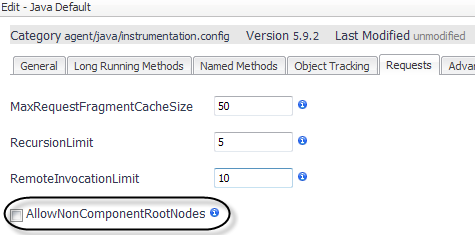
By default, the Java EE agent collects requests that start at a defined component technology (such as HTTP, JMS, RMI, EJB, or Servlet) or a custom component. Enable the AllowNonComponentRootNodes setting to allow the Java EE agent to collect information on requests that start at any method. This may be useful when using the X-Agent or the StopCurrentRequestInMethods configuration setting. For more information, see Separating requests by parent method.
1
Click the Requests tab of the Edit dialog box.
2
Select the check box for AllowNonComponentRootNodes.
3
Click Save.
If you manually edit the instrumentation.config file, use the following syntax to enable non-component root nodes.
관련 문서

The document was helpful.

평가 결과 선택

I easily found the information I needed.

평가 결과 선택