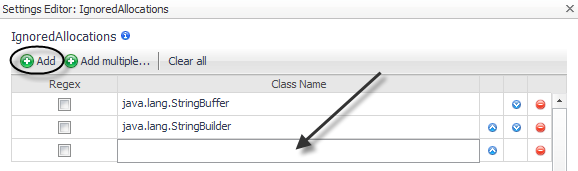
Even with object tracking enabled, some object allocations may be considered uninteresting. For example, the StringBuffer class is allocated as a temporary object by boilerplate code and is automatically generated by Java compilers. As a result of string manipulation, these objects are generated but should not cause memory issues. Use the IgnoredAllocations property to indicate objects that should not be tracked, even if those allocations are performed by classes in the tracked class list. For more information about tracking object classes, see Tracking object classes .
By default, java.lang.StringBuffer and java.lang.StringBuilder are ignored.
|
1 |
|
3 |
In the new row that appears, type the name in the Class Name box. |
|
4 |
If you want to specify the name as a regular expression, select the Regex check box. |
|
6 |
Click Save. |
If you manually edit the instrumentation.config file, use the following syntax to specify the ignored allocations.
IgnoredAllocations = ClassList();
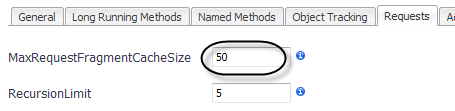
In the period between requests, the Java EE agent caches the data structures used to collect the data for request fragments. The MaxRequestFragmentCacheSize setting determines the maximum number of request fragments that are stored in the cache. The default value is 50. Set the value to zero (0) to disable the cache.
|
1 |
Click the Requests tab of the Edit dialog box. |
|
2 |
Type a value in the MaxRequestFragmentCacheSize box. |
|
3 |
Click Save. |
If you manually edit the instrumentation.config file, use the following syntax to specify the maximum request fragment cache size.
MaxRequestFragmentCacheSize = 50;
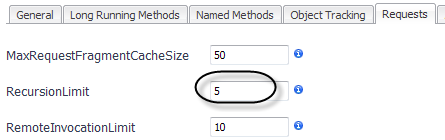
The RecursionLimit configuration setting adjusts the number of recursive calls for which the Java EE agent collects detailed performance information. Beyond this number, the Java EE agent collects and aggregates timing information for the entire recursive sequence.
|
1 |
Click the Requests tab of the Edit dialog box. |
|
2 |
Type a value in the RecursionLimit box. |
|
3 |
Click Save. |
If you manually edit the instrumentation.config file, use the following syntax to specify the recursion limit.


 beside