Submitting forms on the support site are temporary unavailable for schedule maintenance. If you need immediate assistance please contact technical support. We apologize for the inconvenience.
라이브 도움말 보기
등록 완료
로그인
가격 산정 요청
영업 담당자에게 문의
제품 번들을 선택했습니다. 귀하의 요청에 더 적합한 서비스를 제공해 드릴 수 있도록 개별 제품을 선택해 주십시오. *
지금은 채팅에 회신할 수 있는 기술 지원 엔지니어가 없습니다. 즉각적인 서비스를 받으려면 당사의 서비스 요청 양식을 사용하여 요청을 제출하십시오.
다음 문서의 설명에 따라 문제를 해결할 수 있습니다.
When Collaboration Services creates a stub object, it verifies that no other object with the same address exists in the forest by querying the nearest Global Catalog. If the object already exists, Collaboration Services can take any of the following actions:
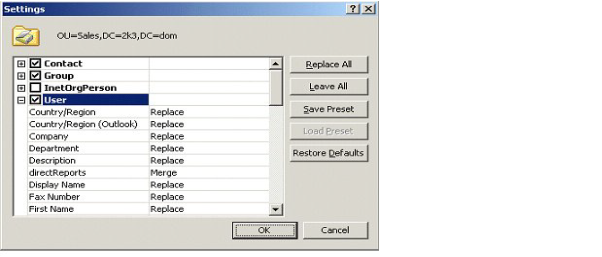
When configuring the matching, you can choose the attribute synchronization direction on a per-attribute basis, so some or all attributes are synchronized from the published object to the object you are matching into. Attribute synchronization is useful if the user account is updated by the provisioning system in one of the forests and these changes need to be propagated to the same user’s accounts in other forests.
If you have active user accounts of the same user in multiple forests but do not want to use matching for some reason, you can do one of the following:
There can be other conflicts that are not detected and resolved by Collaboration Services automatically because the conflicting objects do not cause technical issues, but can confuse the end users. Examples include:
After you decide how conflicts will be resolved in each forest, you can plan the Collaboration Services configuration. The main decision will be which forest should serve as the headquarters (HQ) for Collaboration Services synchronization. Only one HQ forest can be set up in a Collaboration Services environment.
Consider the following criteria when selecting the HQ forest:
To increase synchronization performance and reduce network traffic and HQ server load, choose the forest containing the most data to be synchronized.
The HQ forest processes all synchronized data from all synchronization partners. Therefore, there is a higher data processing load on the HQ Collaboration Services server, which means higher hardware requirements.
The HQ forest administrator will be a key person to help other partners in tuning performance and troubleshooting problems for the whole Collaboration Services structure.
You must also consider how you will form object collections. This decision may require additional environment preparation. Collaboration Services allows both explicit and dynamic object selection.
Dynamic object selection may be based on the following:
Decide if you need mappers to customize Collaboration Services synchronization. For example, consider using mappers if:
계열사 지원 사이트에서 Quest *제품*에 대한 온라인 지원 도움말을 볼 수 있습니다. 올바른 *제품* 지원 콘텐츠 및 지원에 연결하려면 계속을 클릭하십시오.
The document was helpful.
평가 결과 선택
I easily found the information I needed.
Quest Software 포털은 더 이상 IE 8, 9, 10을 지원하지 않습니다. 브라우저를 최신 버전의 Internet Explorer나 Chrome으로 업그레이드하는 것이 좋습니다.
IE 11로 업그레이드 여기를 클릭
Chrome으로 업그레이드 여기를 클릭
IE 8, 9 또는 10을 계속 사용할 경우 당사가 제공하는 뛰어난 셀프서비스 기능 모두를 최대한으로 활용하실 수 없습니다.