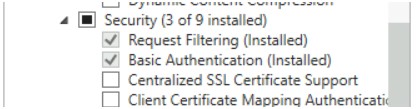
After Completion of Password Propagation installation, getting Error when trying to access url.
HTTP Error 401.2 - Unauthorized You are not authorized to view this page due to invalid authentication headers.Missing IIS feature Basic or Windows Authentication. One of these needs to be enabled or installed.
Verify by Checking Authentication Settings in IIS
Resolution 1
To Install the feature with Powershell
## Security
Enable-WindowsOptionalFeature -Online -FeatureName IIS-RequestFiltering
Enable-WindowsOptionalFeature -Online -FeatureName IIS-WindowsAuthentication ### Install this only when you are using Windows Authentication
Enable-WindowsOptionalFeature -Online -FeatureName IIS-BasicAuthentication ### Install this only when you are using Basic Authentication
Resolution 2
To Install the feature via the UI select Server Feature installation Wizard