Submitting forms on the support site are temporary unavailable for schedule maintenance. If you need immediate assistance please contact technical support. We apologize for the inconvenience.
Adobe Reader X is not able to open archived PDF files
설명
Our customers reported problems in the past connected to the latest release of Adobe Reader, version X. PDF files changed to shortcuts by MAM4Files or SFA were not retrievable by Adobe Reader X. The files could be opened without any obstacle if an older version of Adobe or any other PDF viewer was used. The problem was present on both Windows 2003 and 2008 servers. Adobe has simply changed something in the way it is opening the files. No retrieve request was sent to the kernel driver.
원인
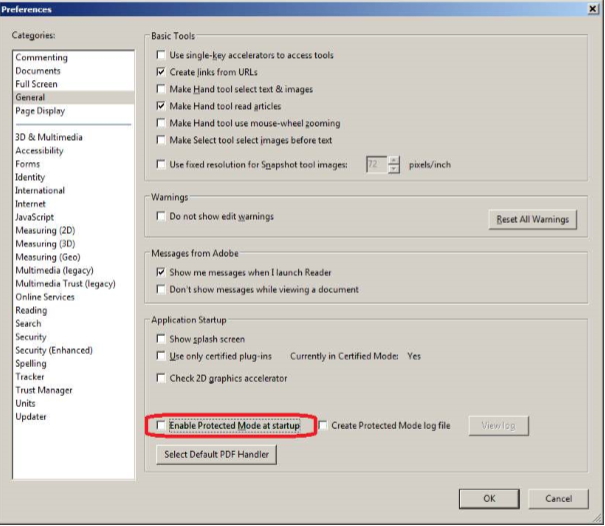
As predicted, it is a new setting which has to be turned off. Protected Mode is a new security feature for Adobe Reader X that protects users' applications and data by limiting what malicious files can do and access. It seems it is taking files having the Reparse Point attribute set as a “malicious” file. Protected Mode is enabled by default.
해결 방안
If you are having the problem described above, simply disable protected mode manually by choosing Edit > Preferences > General tab and unchecking Enable Protected Mode on startup.