If you changed the Nexus Connection (see Managing Nexus connections for details), you can update any target application servers that are using that Nexus connection through the Integration Configurations tab of the Java Administration dashboard.
|
1 |
On the navigation panel, under Dashboards, click Application Servers > Administration. |
|
3 |
On the Java view, click the Integration Configurations tab. |
|
4 |
In the Configuration Name and Targets list, expand the configuration group (for example, WebLogic on Windows: startWebLogic) that contains the target by clicking the ‘+’ sign. |
|
6 |
In the menu that opens, click Update Nexus connection. |
|
1 |
On the navigation panel, under Dashboards, click Application Servers > Administration. |
|
3 |
On the Java Administration dashboard, click the Integration Configurations tab. |
|
4 |
In the Configuration Name and Targets list, expand the configuration group (for example, WebLogic on Windows: startWebLogic) by clicking the ‘+’ sign. |
|
6 |
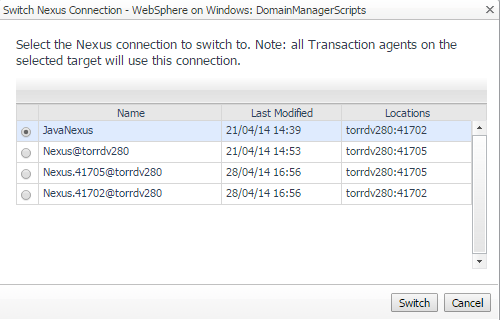
In the list that opens, select Switch Nexus Connection. |
|
8 |
Click Switch to save your changes. |
|
1 |
On the navigation panel, under Dashboards, click Application Servers > Administration. |
|
3 |
On the Java Administration dashboard, click the Integration Configurations tab. |
|
4 |
In the Configuration Name and Targets list, click the name of the configuration that you want to edit (for example, WebLogic on Windows: startWebLogic). |
|
5 |
In the menu that opens, click Properties. |
|
7 |
Click Save. |
You can configure the following for logs that the Java EE agents produces:
|
• |
|
• |
The directory in which log files are created (if other than the default directory, <VERSIONED_SUBDIRECTORY>/logs) |

