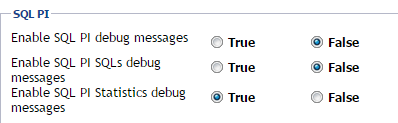
PI Statistics are enabled by default these can be turned off from the Agent Status Properties dashboard for the database agent in the SQL PI section (last flag).
You can stop SQL PI statistics collection using the attached Groovy scripts. Users must be logged into Supportlink to download these attachments.
Use List_all_of_the_Oracle_PI_Debug_Statistics_settings.groovy to check current status.
Use Update_all_Oracle_PI_Statistics_debug_to_off.groovy to disable statistics.
Use List_all_of_the_Oracle_RAC_PI_Debug_Statistics_settings.groovy to check current status.
Use Update_all_Oracle_RAC_PI_Statistics_debug_to_off.groovy to disable statistics.
Use List_all_of_the_SQL_PI_Debug_Statistics_settings.groovy to check current status.
Use Update_all_SQL_PI_Statistics_debug_to_off.groovy to disable statistics.
Complete these steps to change the default settings for future SQL Server and Oracle agents.
{FglAM}\state\default\agents\{agent-ID}\DB_SQL_Server\ or DB_Oracle\.gz and of the numbered log files that include this string "sql_pi_statistics"
