|
• |
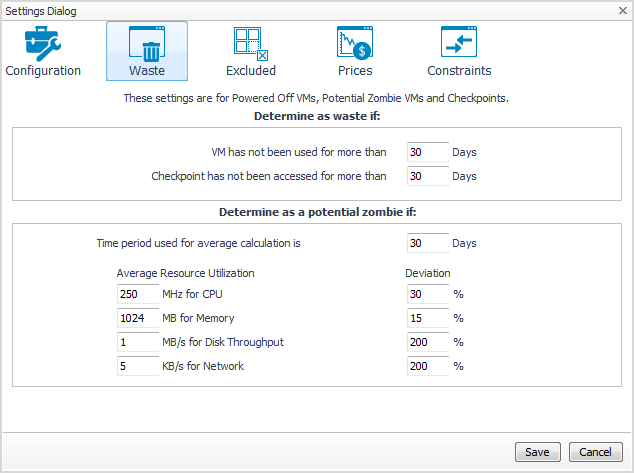
Determine as waste if area: A resource is considered wasted if one of the following settings is met: |
|
• |
VM has not been used for more than [x] Days. Defines when a powered-off VM is wasting resources in your environment by not being used. |
|
• |
Checkpoint has not been accessed for more than [x] Days. Defines when a checkpoint is wasting resources in your environment by not being accessed. |
|
• |
Determine as a potential zombie if area: A VM is considered a zombie VM if the following five settings are met: |
|
• |
Time period used for average calculation is [x] Days. Defines when a resource is considered a zombie VM, by looking at the period used for average calculations. |
|
• |
Average Resource Utilization—Deviation. Defines when a resource is considered a zombie VM, by looking at the CPU, memory, disk throughput, and network utilization values. |

|
• |


|
1 |
|
2 |
In the Constraint Group Name field, type in name of the new group. |
|
3 |
In the List of Related Object area, define the objects that are related to this constraint group. Click Add Services or Add Virtual Machines, and select the objects from the available lists. |
|
4 |
In the Constraints area, select the options or type the values you want to assign to this group. |
|
5 |
Click Save. |
|
6 |
|
1 |
|
2 |
Click the Edit icon at the right end of the constraint group you want to modify. |
|
4 |
Click Save. |
|
5 |
|
1 |
|
2 |
Select the check box for the constraint group you want to delete, and click Remove Constraint Groups. |
|
3 |
To proceed with the operation, click Confirm. |
|
4 |


