立即与支持人员聊天
与支持团队交流

Foglight for Java EE Technologies 5.9.9 - Installation Guide

Install and Configure Foglight for Java EE Technologies Integrate with JBoss Integrate with Apache Tomcat Integrate with WebLogic Domain Startup Scripts Integrate with WebSphere Integrate with Oracle AS Create a Generic Installation for Manual Java EE Agent Integration Manage Java EE Agent Installations, Integrations, and Configurations Managing Java EE Agent Configurations Java EE Installation Management Java EE Integration Configuration FAQ and Troubleshooting Manual Application Server Integrations AppendixB: Managing Permissions for the Java EE Integration Agent Appendix A: Java EE Application Methods

Object Tracking settings

Tracking object classes

Use the ObjectTrackerClasses setting to watch for objects that are never reclaimed by the garbage collector. You can specify groups of classes with allocated object instances that are tracked during a sampled request.
NOTE: The ObjectTrackerClasses settings only take effect when object tracking is enabled. Object Tracking can be enabled and disabled on a per request basis, by setting the Enable Object Tracking option found in the Application Servers Monitor > Server JVM view. For more information, see the Foglight for Application Servers User Guide. The pre-instrumentor script must be run on all agent machines after changing either the ObjectTrackerClasses or IgnoredAllocations properties.
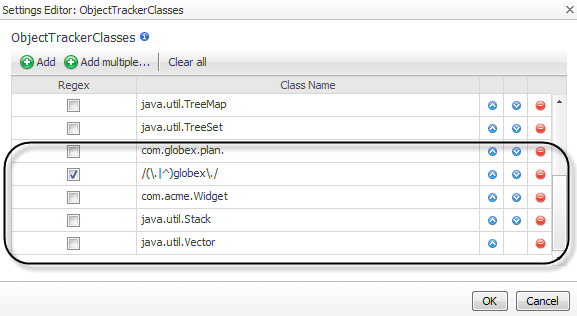
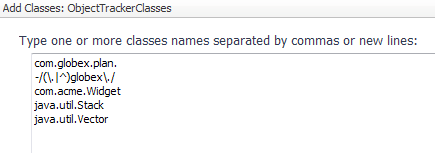
Track all classes in the com.globex.plan package.
Track the com.acme.Widget class.
1
Click the Object Tracking tab of the Edit dialog box.
2
To add tracked object classes, click Edit beside ObjectTrackerClasses.
Click Add multiple to define several classes at once.
5
Click Add.
6
If you manually edit the instrumentation.config file, use the following syntax to specify the object tracking instrumentation.
This example tracks all classes in the com.globex.plan package, but it does not track any other classes with globex in the name. It also tracks the com.acme.Widget class, as well as the listed collection classes.

Ignoring specific objects

Even with object tracking enabled, some object allocations may be considered uninteresting. For example, the StringBuffer class is allocated as a temporary object by boilerplate code and is automatically generated by Java compilers. As a result of string manipulation, these objects are generated but should not cause memory issues. Use the IgnoredAllocations property to indicate objects that should not be tracked, even if those allocations are performed by classes in the tracked class list. For more information about tracking object classes, see Tracking object classes .
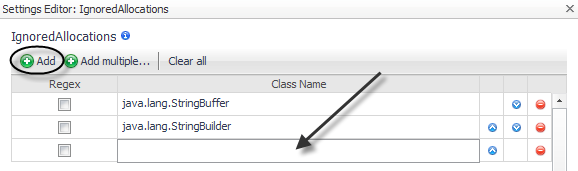
By default, java.lang.StringBuffer and java.lang.StringBuilder are ignored.
1
On the Object Tracking tab, click Edit beside IgnoredAllocations.
6
Click Save.
If you manually edit the instrumentation.config file, use the following syntax to specify the ignored allocations.

Requests settings

相关文档

The document was helpful.

选择评级

I easily found the information I needed.

选择评级