How to Add a Pre or Post-script to Table Creation Statements in Forward Engineering
说明
How to Add a Pre or Post-script to Table Creation Statements in Forward Engineering
解决办法
Description:
How to add a Pre- Post Script t Table creation?
Solution:
Steps:
To add a Pre or Post-Script to a Table….
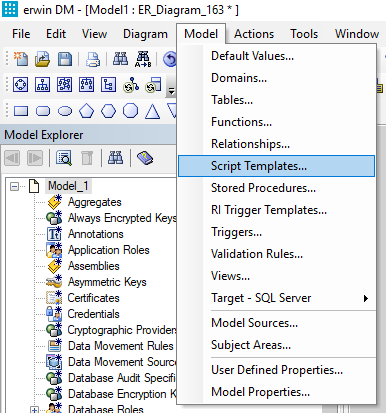
Navigate to Model --> Script Templates
A new window will open. Click the new button
Enter your Pre or Post Script by….
Giving it a name
Specifying Type as Table Level
Indicating if it is a Pre or Post Script in the “Generate As” field
(Optional) By selecting “Attach to New”, you can automatically attach this to newly created Tables
Ensure that “Generate” is selected so that the script is included when Forward Engineering
Entering the SQL for your Pre or Post Script under the “Code” tab
Click “Close”
Attach your Pre or Post script to existing Tables by…
Right click on the table and select “Table Properties"
Under the “Object Creation Order” tab select “Script Templates” for Display
Check the desired script and click “Close”
Then Forward Engineer your Table by selecting Actions --> Forward Engineer --> Schema
In the resulting dialogue under “Option Selection” and “Table”, ensure Pre and / or Post-script are selected (Pre will generate before the other code is generated whereas Post will create it after code is created).