Chat now with support
Chat with Support

Foglight for Java EE Technologies 5.9.7.5 - Installation Guide

Installing and Configuring Foglight for Java EE Technologies Integrating with JBoss Integrating with Tomcat Integrating with WebLogic Domain Startup Scripts Integrating with WebSphere Integrating with Oracle AS Creating a Generic Installation for Manual Java EE Agent Integration Managing Java EE Agent Installations, Integrations, and Configurations Managing Java EE Agent Configurations Managing Java EE Installations Foglight for Java EE Integration Configuration FAQ and Troubleshooting Performing Manual Application Server Integrations Appendix: Managing Permissions for the Java EE Integration Agent Appendix: Foglight for Java EE Application Methods

Changing User Classes Settings

Use the User Classes setting to customize the classes that are treated as user and/or application code.
Excluding a class prevents the class from being instrumented as user code. It may still be partially instrumented if it implements important application server functionality (such as RMI communications).
Including a class ensures the class is specified and instrumented as user code.
3
Click include. The setting switches to exclude.
5
Click the Class Name box and type the name of the class you want to exclude.
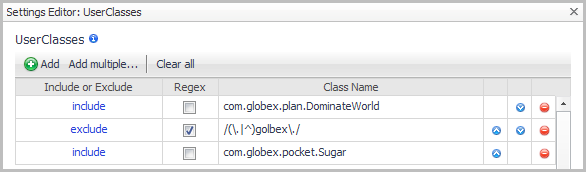
For example, suppose you have an instrumented user class named com.globex.plan.DominateWorld, but the instrumentation is causing excessive load on the agent or Nexus. You can exclude this class.
The class com.globex.plan.DominateWorld is excluded, as well as all classes in the package "com.globex.scheme".
In this case, the class com.globex.plan.DominateWorld is included, but the class com.globex.pocket.Sugar is actually excluded because it matches the exclude pattern on the second line. Also, any classes in net.globex. package or the root globex. package are excluded since they match the exclude regular expression.
6
In the Settings Editor dialog box, click OK to save your changes to the user class instrumentation.
If you manually edit the instrumentation.config file, use the following syntax to enable user class or package instrumentation:
The class com.globex.plan.DominateWorld is excluded, as well as all classes in the package "com.globex.scheme".
In this case, the class com.globex.plan.DominateWorld is included, but the class com.globex.pocket.Sugar is actually excluded because it matches the exclude pattern on the third line. Also, any classes in net.globex. package or the root globex. package are excluded since they match the exclude regular expression.

Changing Custom Component Settings

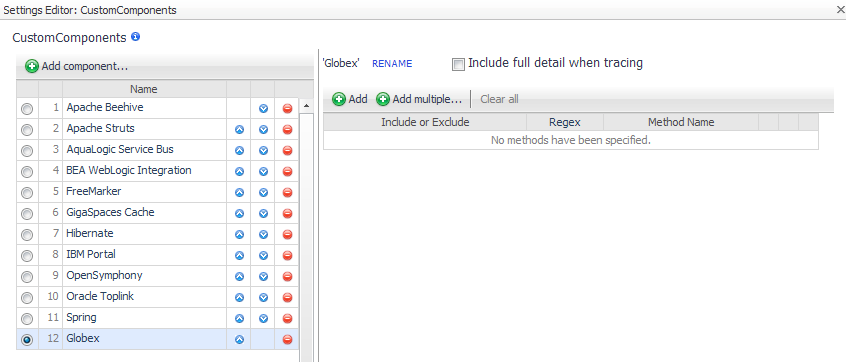
The Custom Components setting extends the default set of J2EE components to be included when recording a session at the Component Detail instrumentation level.
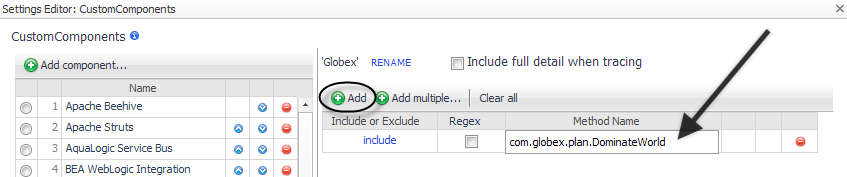
For example, you could add the component Globex, and then specify methods to include or exclude.
a
Click Add component.
Click Add to add a single method at a time.
Click Add multiple to open a text box where you can type a number of methods.
If you manually edit the instrumentation.config file, use the following syntax to specify custom component instrumentation.
1
Edit CustomComponents. Specify the name of each component in a method list, either by entering the name or by forming a regular expression that matches the name or pattern. Enter the include element before each item in the list. For example:
2
After editing the instrumentation.config settings, ensure it is read by restarting the instrumented application servers.

Changing Custom Component Callbacks Settings

Use the Custom Component Callbacks setting to specify which classes or interfaces are used by custom components to call customer written code. The default instrumentation settings include some custom component callbacks for Apache Struts and Spring.
1
On the General tab of the Edit dialog box, click Edit beside CustomComponentCallbacks.
Click Add to add a single class at a time.
Click Add multiple to open a text box where you can type a number of classes.
If you manually edit the instrumentation.config file, use the following syntax to specify custom component callback instrumentation.

Managing Long Running Methods Settings

Related Documents

The document was helpful.

Select Rating

I easily found the information I needed.

Select Rating