Question
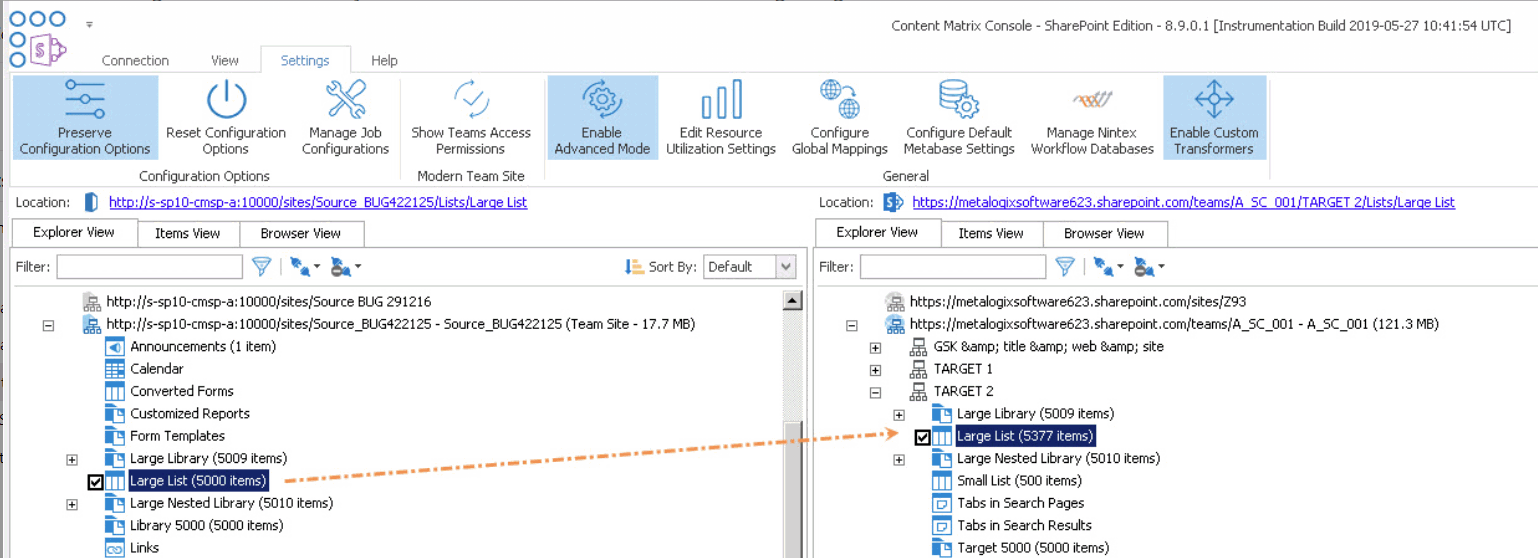
Why is it that, after migrating a list with versioning enabled using the Import Pipeline, there are more items on the target than on the source?
Answer
If you are migrating a batch that includes a list with a base type of CustomList (such as Announcements), versioning is enabled, and Content Matrix has had to resubmit the batch that includes the list, duplicate items may be migrated to the target. By default, these types of lists are excluded from resubmissions, but can be included via the environmentsettings.xml key RetryBatchForCustomListWithVersions.
NOTE: If custom lists are excluded from batch resubmissions and all items are not successfully migrated, you can migrate any outstanding items using incremental migration.
Question
Why is it that, after a migration using the Import Pipeline, some lists with versioning enabled do not appear on the target?
Answer
By default, lists with a base type of CustomList (such as Announcements) are excluded when Content Matrix must resubmit a batch that initially failed to migrate in its entirety (because if they are included, duplicate items may be migrated to the target). These types of lists can be included via the environmentsettings.xml key RetryBatchForCustomListWithVersions)
NOTE: If custom lists are excluded from batch resubmissions and all items are not successfully migrated, you can migrate any outstanding items using incremental migration.
Question
Does Content Matrix support SharePoint Online GCC High connections and migrations?
Answer
Refer to the following tables for specific target connections and migration scenarios that Content Matrix supports for GCC High tenants.
IMPORTANT: In order to use ADFS authentication with a GCC High tenant you must first run a utility provided by Quest Support and enable the setting EnableUserProvidedAuthentication. Refer to the Quest Support Knowledge Base article Enabling User Provided Authentication in Content Matrix for details.
Connections
|
Target Type |
OAuth |
OAuth with MFA |
ADFS |
ADFS |
Web Browser Authentication |
Microsoft 365 Web Browser Authentication |
|---|---|---|---|---|---|---|
|
Tenant |
-- |
|
-- |
-- |
|
|
|
Site |
-- |
|
-- |
|
|
|
Migration Scenarios
See also Migration Limitations When Using Microsoft 365 OAuth with MFA Authentication.
|
Component |
OAuth with MFA |
ADFS |
|---|---|---|
|
Child sites |
|
|
|
Content types |
|
|
|
Site features |
|
|
|
Classic web parts |
-- |
|
|
Theme and Master pages |
|
* Only with Paste as Site Collection action |
|
Root folders and files |
|
|
|
Navigation and Headings |
|
|
|
Lists, folders, files list items, attachments |
|
|
|
List settings: ·Survey options ·Browser-enabled InfoPath form templates |
-- |
|
|
Version data and Authorship data |
|
|
|
SharePoint ID preservation |
|
|
|
Metadata |
|
|
|
Permissions |
|
|
|
Mappings |
|
|
|
Content Matrix filters |
|
|
|
Out-of-the-box workflows |
|
|
|
SharePoint Designer 2010-style workflows |
-- |
(Deprecated) |
|
SharePoint Designer 2013-style workflows |
|
|
|
Nintex forms |
-- |
|
|
Content type InfoPath forms |
-- |
|
|
Information management policies |
-- |
|
Quest Software creates technology and solutions that build the foundation for enterprise AI. Focused on data management and governance, cybersecurity and platform modernization, Quest helps organizations address their most pressing challenges and make the promise of AI a reality. Around the globe, more than 45,000 companies including over 90% of the Fortune 500 count on Quest Software. For more information, visit www.quest.com or follow Quest Software on X (formerly Twitter) and LinkedIn.