Copy occurs between a Windows machine and a Netapp Filer. The shares are created on the Netapp Filer side manually. User who performs the operation (member of domain admins) and Everyone group are given full control permissions. When the copy starts, Secure Copy reports continuous “Access Denied” errors, and some files being skipped.
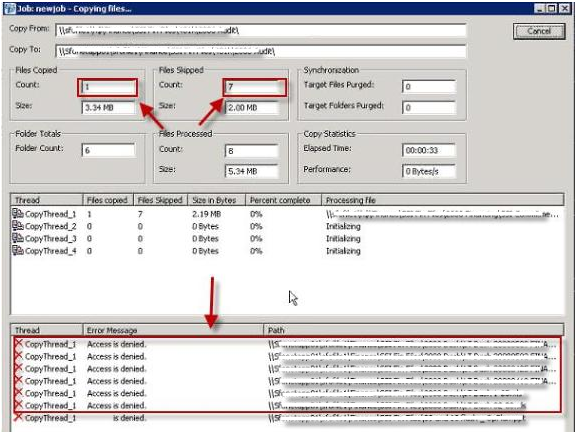
Even though the errors appear to be generated from the source, the issue is due to configuration on the Netapp Filer. When Secure Copy tested on Windows to Windows scenarios it provides full compatibility. Since Netapp Filer is not Windows, Secure Copy’s compatibility is limited.
This is for this specific scenario. Since every Netapp Filer can be configured differently it may not work in every environment, but this solution is intended to provide pointers for fixing this anomaly.
The folders were being copied to file://netappfiler/Share
On the Netapp filer CIFS share, right click on the share and select “Edit”, then go to the “Options” tab. Under “Enable virus scanning” disable the options “For all file accesses” and “When files are opened for reading”.
NOTE: After the migration, virus protection should be re-enabled.
![[image]](https://support.quest.com/KBArticleImages/SL4544/fbf8c9e7.jpg)
Secure Copy should be configured as follows:
Source: file://sourceserver/Adminshare$(D$ for instance)\SourceFolder
Target: file://netappfiler/Share
“Override security on access denied (you must be an administrator)” option is checked.
There should be no “Access Denied” messages if everything works properly, and permissions should be copied successfully.

