|
1 |
On the navigation panel, under Dashboards, click Application Servers > Administration. |
|
3 |
Click the Integration Configurations tab. |
|
1 |
On the navigation panel, under Dashboards, click Application Servers > Administration. |
|
3 |
On the Java view, click Integration Configurations. |
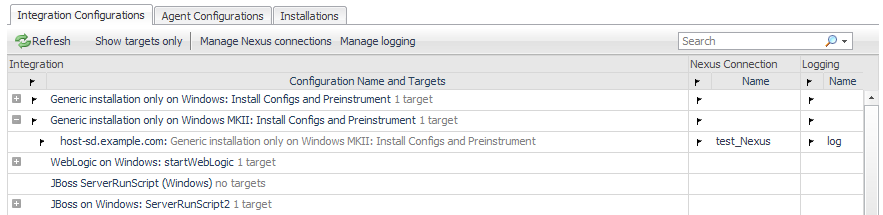
On this tab, the Configuration Name is the type of integration configuration. For example: WebLogic on Windows: startWebLogic, or JBoss ServerRunScript (Windows).
The term target is the integrated host that is using the integration configuration. For example: tor‑anoorani: WebLogic on Windows: startWebLogic.
If you only want to see the targets and not the configurations they are using, click Show targets only.
|
TIP: For more information about the Nexus, see the topic Understanding the default Nexus in the Foglight for Application Servers Administration and Configuration Guide or help. |
|
1 |
On the navigation panel, under Dashboards, click Application Servers > Administration. |
|
3 |
On the Java view, click the Integration Configurations tab. |
|
4 |
Click Manage Nexus connections. |
|
5 |
 Add Nexus location and select a Nexus from the list.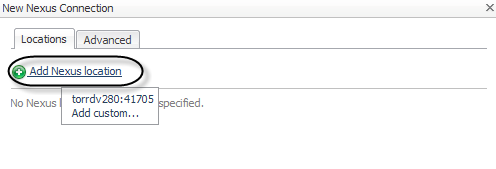
|
8 |
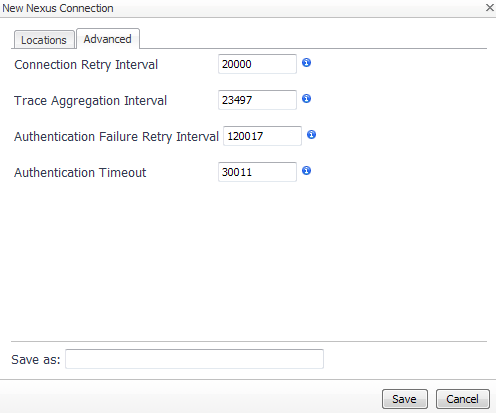
Click the Advanced tab. |
|
10 |
|
11 |
Click Save. |



 icon to view a detailed description of the setting and its effects.