Tchater maintenant avec le support
Tchattez avec un ingénieur du support

Foglight for Hyper-V 5.7.0 - User and Reference Guide

About Foglight for Hyper-V Agent administration Performance monitoring with the Hyper-V Environment dashboard Performance investigation with the Hyper-V Explorer Foglight for Hyper-V alarms Appendix: Hyper-V Agent error codes

Setting the alarm sensitivity level

3
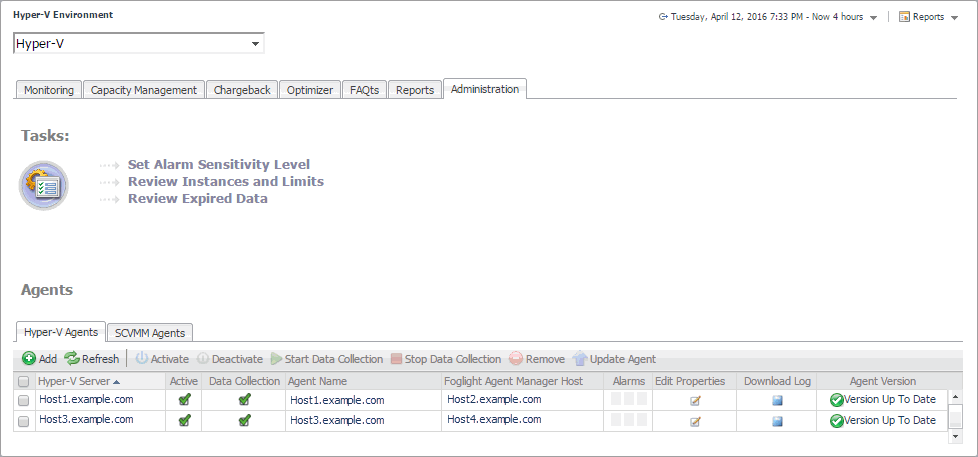
On the navigation panel, under Dashboards, choose Hyper-V > Hyper-V Environment.
Figure 266. Administration tab
5
On the Administration tab, click Set Alarm Sensitivity Level.
The Set Alarm Sensitivity Level dialog box appears.
Figure 267. Set Alarm Sensitivity Level dialog box
6
In the Set Alarm Sensitivity Level dialog box, select the desired sensitivity level: Essential, Normal, or Tuning.
7
Click Save.
The Set Alarm Sensitivity Level dialog box closes.

Finding alarms using the action panel

On the action panel, on the General tab, under Actions, click View Virtual Infrastructure Alarms.
The Hyper-V Alarms dashboard appears in the display area.

Appendix: Hyper-V Agent error codes

Documents connexes

The document was helpful.

Sélectionner une évaluation

I easily found the information I needed.

Sélectionner une évaluation