The Redirect Edit View enables you to redirect Evolve users to different views on entering the edit mode.
Hover over 
 |
Redirection works only with more than one object type. |
|---|
To create an object page for an object type, follow these steps:
Start Evolve Designer.
Click a model. For example, EA Foundation Sample Model.
Click Site.
Expand Site.
Right-click Object Pages and select Add Object Page for Object Type.

Select the required object type. For example, Application.
In the Page Name box, replace “application” with “application1”.

Click Save.
Click Dynamic Site.
To configure the Redirect Edit View feature, follow these steps:
Click Administration.

Click Redirect Edit View.
Click the Evolve view drop-down list box and select the required object type. For example, Application (application).
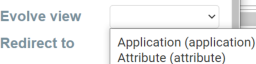
Click the Redirect to drop-down list box and select the object page where you want to redirect. For example, Application (application1).

Click 
You will be notified that the "Configuration draft has been saved".
Click 
You will be notified that the "Configuration published successfully".
To view the redirect URL, follow these steps:
In the left pane, click Application, and select Application List.
Click Application List.
Click 
For example, the following image displays the object page of Activity Monitoring.

Click 
This redirects you to the application1 view.
In the address bar, you can now see redirected view selected during configuration.


