There is a requirement to migrate a full site and filter out some legacy list columns that are no longer required.
The built-in filter capabilities of Content Matrix does not allow for list-level column filtering within a site copy (only a list copy). A transformer can be used instead.
Note: Make sure to enable the Advanced Mode on the Settings tab of the Content Matrix Console to see all the job configuration options.
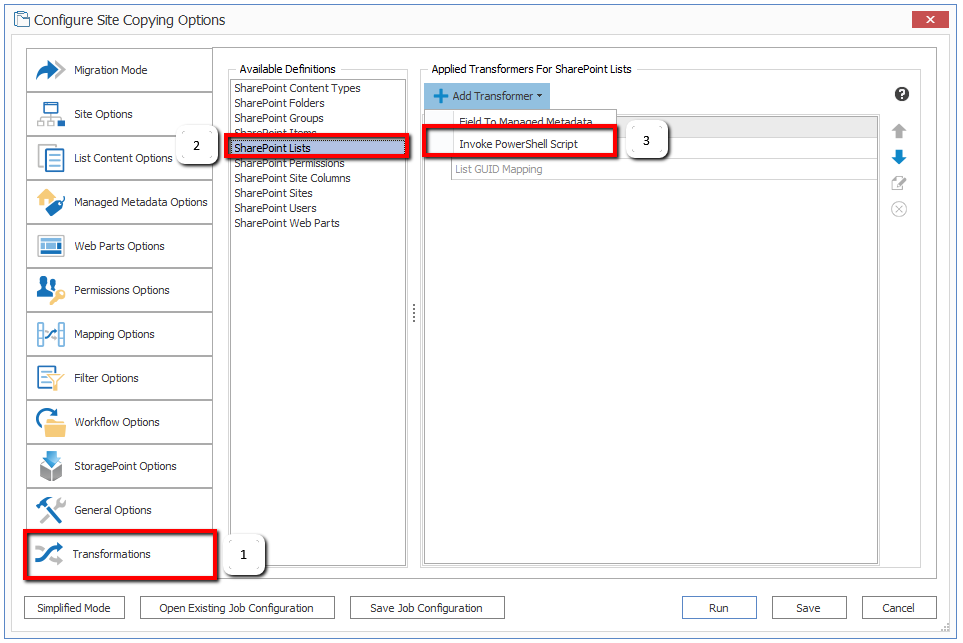
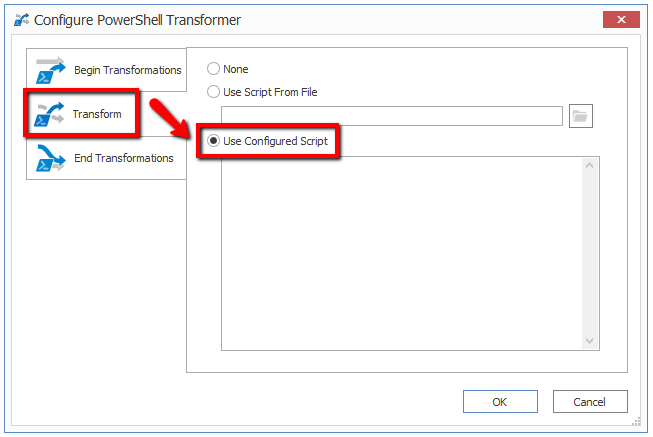
if($dataObject.XML -ne $null)
{
 $doc = new-Object System.Xml.XmlDocument;
 $doc.LoadXml($dataObject.XML);

 $nodes = $doc.SelectNodes('/List/Views/View/ViewFields/FieldRef[@Name="ColumnToFilter"] | /List/Fields/Field[@StaticName="ColumnToFilter"]');

 if($nodes -ne $null)
 {
 ForEach ($node in $nodes)
 {
 $node.ParentNode.RemoveChild($node);
 }
 $dataObject.UpdateList($doc.OuterXml, $true, $true);
 }
}
Also, specify the Internal Name of the custom column and not the Display Name. For example, the column's Display Name is "To Migrate", but the Internal Name is "To_x0020_Migrate", which is generated by SharePoint automatically.
