Chat now with support
Chat with Support

Foglight for Storage Management Shared 4.4.5 - User and Reference Guide

Getting Started Monitoring Storage Performance Investigating Storage Devices Investigating Storage Components Troubleshooting Storage Performance Managing Data Collection, Rules, and Alarms Understanding Metrics Online-Only Topics

Analyzing the Pool

When pool timeline bars show abnormal average queue depth or ops rate, analyze the changes within the pool and the load on the pool.

Perform Pool Change Analysis. The Pool Change analyzer identifies the LUNs primarily responsible for increased I/O. It compares LUN activity in the problem time range with LUN activity during the same time range in the past. Changes are reported in terms of average operations rate and change amount.
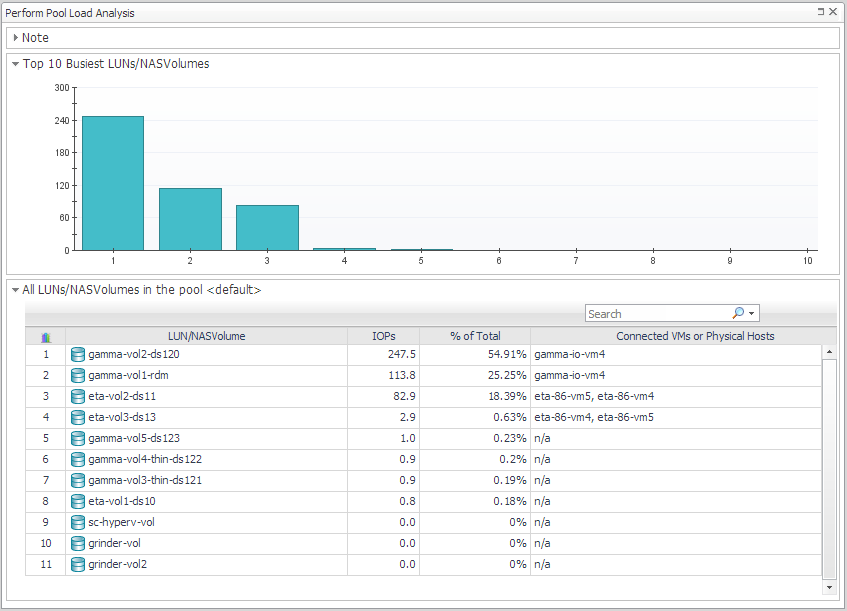
Perform Pool Load Analysis. The Pool Load analyzer identifies the busiest LUNs and ranks them based on their activity during the same time range over the last 30 days (not the current time frame). Activity is measured in operations per second.
TIP: You can change the comparison time range by clicking Change and selecting a new date and time range.
3
Click Perform Pool Load Analysis.

Changing Latency Thresholds

One way Foglight for Storage Management determines if the performance problem is occurring in the SAN storage environment is to evaluate latency against the thresholds defined for latency in registry variables. The latency thresholds used for analysis are, by default, the same thresholds as are used for generating latency alarms. If you think it would be helpful to adjust the threshold values for your analysis, you can change the threshold values using the Storage Troubleshooting dashboard. The original registry variables are not updated.

3
Click Apply.

Understanding the Troubleshooting Algorithm

To determine if the problem is likely to be a storage performance problem, Foglight for Storage Management evaluates latency metrics against thresholds and typical performance, and disk extent metrics against the I/O being performed to the extent by the virtual machine. If the likely cause of the problem is slow performance in the SAN Storage environment, Foglight for Storage Management examines the LUN or NASVolume. If no circumstances, such as a rebuild, are identified as a cause of high latency, the pool is examined.

Managing Data Collection, Rules, and Alarms

NOTE: This section is intended for users with the role Storage Administrator. Some tasks also require the Foglight for Storage Management role of Administrator (as noted) to manage agents and rules.

You can collect additional types of relationship data, change collection schedules, manage rules, and manage alarms.

Modifying Data Collection Schedules (Administrator role required)

If you are looking for information about configuring Foglight for Storage Management agents and agent masters, reviewing agent alarms, creating support bundles, or backing up data, see the Foglight for Storage Management Installation Guide.

Related Documents

The document was helpful.

Select Rating

I easily found the information I needed.

Select Rating