Default NetVault Communications Port
The default port that NetVault uses to communicate with other NetVault machines is port 20031. If there is a firewall between the NetVault Server and its Clients then open this port and the range of ports that will be used (e.g. 20021 to 20131) in your firewall in both directions for UDP and TCP.
If there is a port clash and port 20031 is already in use on a machine, it is possible to change the default port that NetVault uses for inter-machine communication. Please refer to the following KB article: How to reconfigure NetVault to use a different port number.
To communicate locally between processes on the same machine, NetVault uses port 20032 which it binds to the loopback address 127.0.0.1. It is therefore not necessary to open this port in your firewall.
NetVault 10.0.x Firewall Test
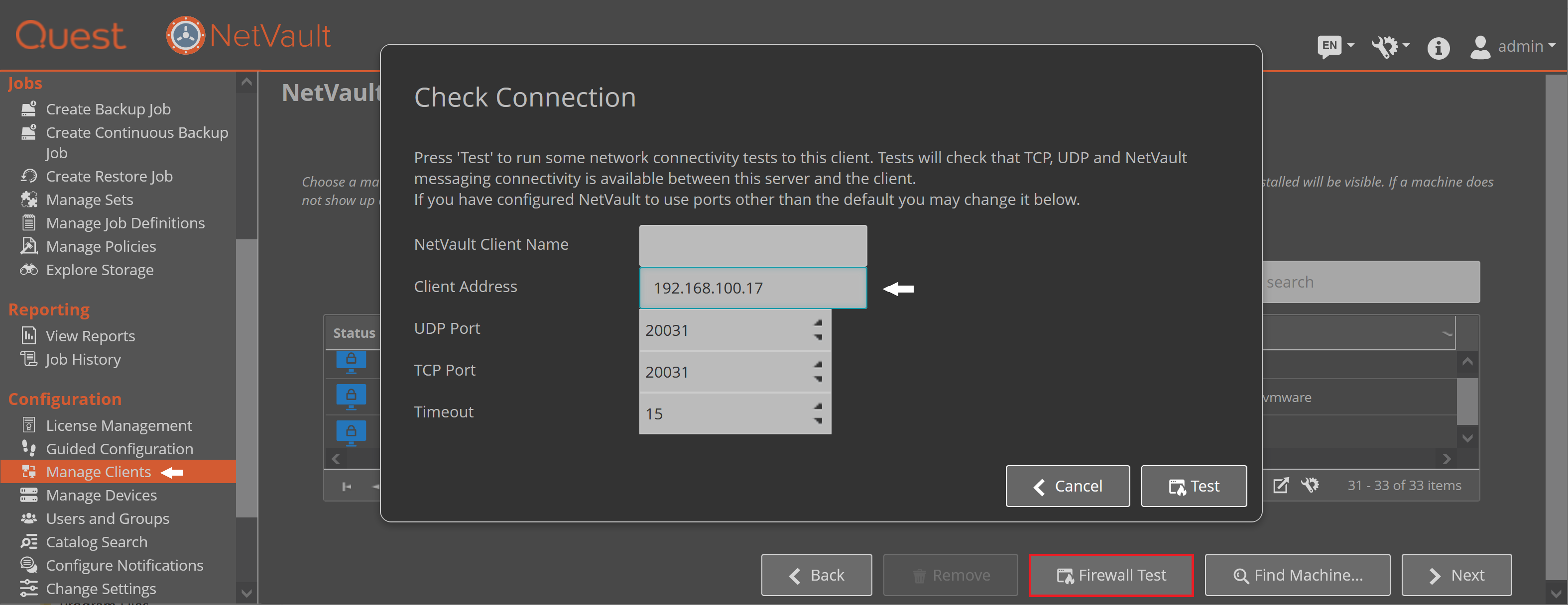
Since NetVault 10.0.x, NetVault offers a "Firewall Test" from the Manage Clients screen. As the comments on the "Check Connection" pop-up explain. This tests UDP and TCP communication between the NetVault Server and the selected Client using the default port number of 20031. If you have reconfigured NetVault to use a different port as explained in How to reconfigure NetVault to use a different port number, then you can use the arrows to select the port number that you have configured NetVault to use.
The test can be found on the Client Addition Wizard:
What do the tests do?
If when you run the Firewall Test and both the UDP and TCP connections fail as follows then this suggests that the port in question is blocked by your firewall or the NetVault services on the client are not running.
Outbound UDP Messaging [Fail]
Outbound TCP Messaging [Fail]
NetVault Messaging Test [Pass]
If you get the following results to your Firewall Test, then this suggests that the port is open for UDP but maybe not TCP, but could also indicate that you have chosen a port number that NetVault is not configured to use.
Outbound UDP Messaging [Pass]
Outbound TCP Messaging [Fail]
NetVault Messaging Test [Pass]
If you get the following result, then this suggests that the TCP and UDP ports are open on the server side, but the client cannot send messages back to the server. Check the firewall configuration on the client.
Outbound UDP Messaging [Pass]
Outbound TCP Messaging [Pass]
NetVault Messaging Test [Fail]
Client is Outside Firewall
If there is any firewall between the NetVault Server and the NetVault client, then you must select the "Client is outside firewall" checkbox. Otherwise communication through the firewall to the client will not work.
NetVault Server and Client Firewall Settings.
These settings tell NetVault which ports and or ports ranges you have assigned in the firewall for communication with plugins and devices on clients. The port ranges that you specify in these settings MUST also be opened up in the firewall you are using for both UDP and TCP in both directions.
Ports for devices using RDA protocol
When using the RDA protocol, open up ports 11000 and 10011 in firewalls in order for NetVault to communicate with devices such as DR appliances and servers running QoreStor.
Port for DD Boost Appliances
To enable a NetVault Server or Client to backup to a DD Boost Appliance you need to enable outbound TCP port 2049
Ports for SmartDisk Devices
In order to backup and restore to SmartDisk you must open the default ports 37451, 37452 and 37453.
Ports for VMware Backups
The VMware API that the Plugin for VMware uses requires ports 902 and 443 to be opened in the firewall. Please refer to the following NetVault and VMware KB articles for more details of VMware ports.

