Below you will find the options we have to organize the connections on Toad for Oracle.
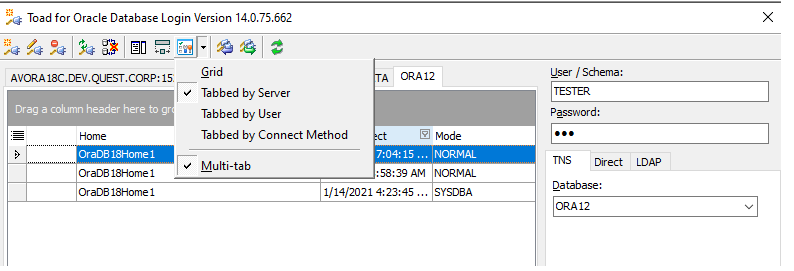
1. USING THE SET VIEW STYLE BUTTON.
You can set different options to filter the connections and to show multi-tabs as well.
You can filter by:
Grid: Will only show the grid with the connections.
Tabbed by the server: Will set the tabs to filter by the server.
Tabbed by User: Will set the tabs to filter by user.
Tabbed by connection type: Will set the tabs to filter by connection type.
Multi-tab checkbox: This will allow tabs to group in layers for better responsiveness according to the size of the connections window.
2. USING THE GRID:
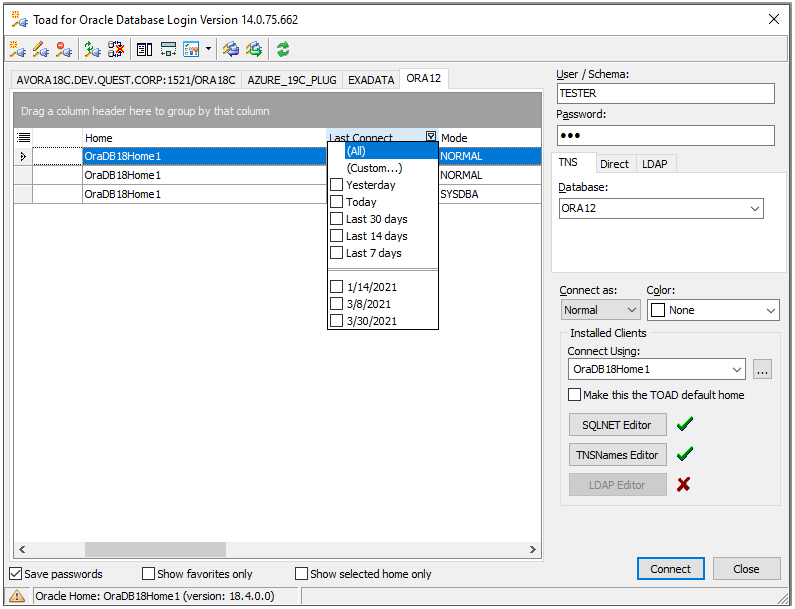
You can filter by time on the Grid in the 'Last Connect' column and you can select from a period since last connected to the DB. (7 days - 30 days, for example.) Maybe this will help you to take out some connections you normally won't use.
3. DELETING CONNECTIONS:
You can delete any connection by clicking on it to make sure it is highlighted and then pressing the 'delete' key.
If you are filtering by tabs and would like to delete a tab, all the connections related to that tab must be deleted.

