This information applies to:
File System Auditor version 2.5 and higher
HOW TO:
Enable Access-based Enumeration in Windows Server 2008
Windows Explorer will cause a read to be generated when enumerating sub-folders and files that the mouse is hovering over. This is a known behavior of the Windows environment. Microsoft created a feature called Access-based Enumeration that will allow users to see only files and folders for which they have access, thus eliminate the false positive or access denied response.
Access-based Enumeration is built into Windows Server 2008. However, access-based enumeration is not enabled by default on the following types of shared folders:
Shared folders that are created with Share and Storage Management, Advanced Sharing in Windows Explorer, or the net share command
Volumes
Folders or volumes that are shared for administrative purposes, such as C$ and ADMIN$
To enable this feature in Server 2008 open the Run command and type “mmc”, to launch the Windows Management Console, (figure 1).
![[image]](https://support.quest.com/KBArticleImages/SL3776/60bc5c8c.jpg)
Figure 1
Select File > Add/Remove Snap-In from the Management Console menu to select a management snap-in, (figure 2).
![[image]](https://support.quest.com/KBArticleImages/SL3776/a46e4a72.jpg)
Figure 2
Select the Share and Storage Management snap-in, and click “Add” then “Ok”, (figure 3).
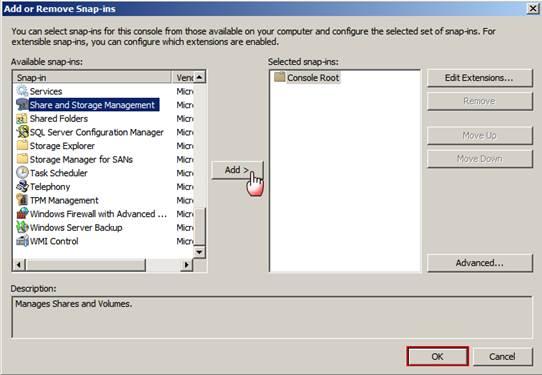
Figure 3
Right click on the target share, and select properties from the content menu, (figure 4).
![[image]](https://support.quest.com/KBArticleImages/SL3776/bf20f236.jpg)
Figure 4
If Access-based Enumeration is disabled for the selected share, “Disabled” will be reflected in the Access-based enumeration field. To change this value, click the “Advanced” button, (figure 5).
![[image]](https://support.quest.com/KBArticleImages/SL3776/51215134.jpg)
Figure 5
Check the “Enable Access-based enumeration” checkbox, (Figure 5).
![[image]](https://support.quest.com/KBArticleImages/SL3776/bf467ddf.jpg)
Figure 6
Related Articles or Solutions:
http://technet.microsoft.com/en-us/library/dd772681(WS.10).aspx

