When installing the administrative service in the Desktop Authority Service Management a Business Logic error is received.
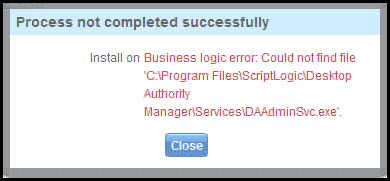
This particular Business logic error is received because DAAdminSvc.exe file is located in the incorrect path.
On server were Desktop Authority is installed navigate to C:\ Program Files(x86)\Scriptlogic\Desktop Authority Manager\services\SLService (64 Bit) or to C:\ Program Files\Scriptlogic\Desktop Authority Manager\services\SLService (32 Bit) and locate the DAAdminSvc.exe file. Copy the file from its current location into to C:\ Program Files(x86)\Scriptlogic\Desktop Authority Manager\services (64 Bit) or C:\ Program Files\Scriptlogic\Desktop Authority Manager\services (32 Bit).Once the file has been copied to the new location return to the service management in the Desktop Authority Console and reinstall the Administrative Service.

