Turn off "automount disable"
- This will disable automounting of Volumes attached to the Operating System
Turn off “automount scrub”
- This command will turn off automatic drive letter assignments
Open an elevated cmd on the Proxy Machine on which the VMware Plug-in is installed and the LUN's are to be presented to:
DISKPART
automount disable
Press Enter
If successfully committed, this message appears: "Automatic mounting of new volumes disabled"
automount scrub
Press Enter
If successfully committed, this message appear:
"DiskPart successfully scrubbed the mount point settings in the system.
Automatic mounting of new volumes disabled."
To make sure the "automount disable" is also written to the registry:
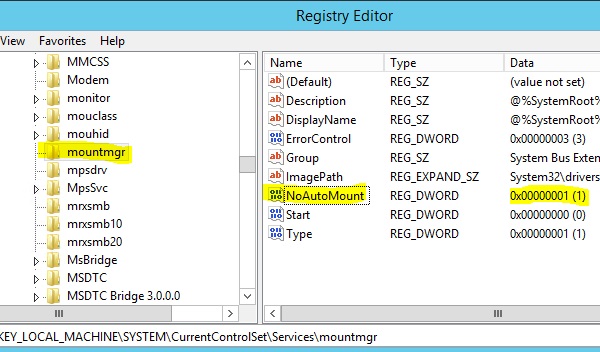
Open regedit and navigate to the following key:
HKEY_LOCAL_MACHINE\SYSTEM\CurrentControlSet\Services\MountMgr\NoAutoMount
The value for NoAutoMount should be 1.
Best practices would be to reboot after both these changes have been applied successfully.
When the zoning is configured correctly, the LUN's can be presented to the Proxy Machine.

