
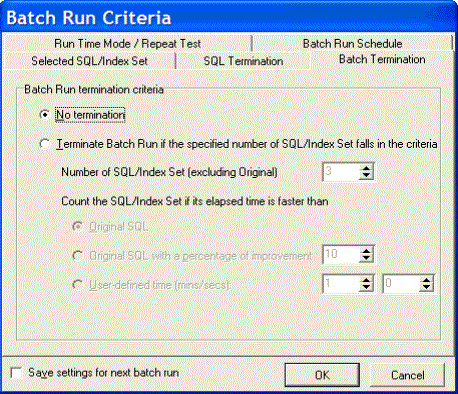
The Batch Termination page of the Batch Run Criteria window is used to determine if and when to terminate the Batch Run. It enables you to find SQL and index-set alternatives that give you performance improvement without having to execute every alternative.
Tip: To save all settings on the Batch Run Criteria dialog for subsequent batch runs, select Save setting for the next batch run.
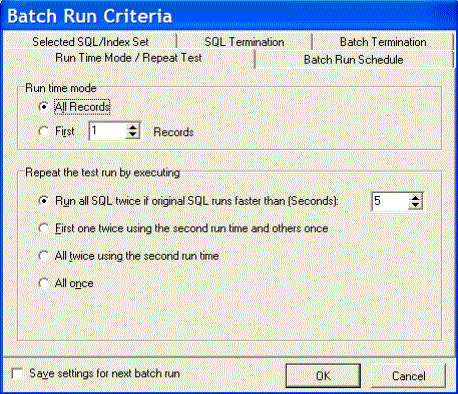
The Run Time Mode/Repeat Test tab of the Batch Run Criteria window is divided into two sections.
Tip: To save all settings on the Batch Run Criteria dialog for subsequent batch runs, select Save setting for the next batch run.
|
Run Time Mode |
Description |
|
All Records |
Specify to retrieve the run time for processing all records. |
|
First n Record(s) |
Specify to retrieve the run time for processing n records where you specify the number of records retrieved. |
|
Repeat the test run by executing |
Description |
| Run all SQL twice if original SQL runs faster than (Seconds) | This option executes the SQL and index-set alternatives twice if the run time for the original SQL is greater than the value you enter in the associated field. |
|
First one twice using the second run time and others once |
This option is suitable for SQL and index-set alternatives with normal run times. The first time you access data from table, the data is cached into memory. This process takes few moments. The next time you access that data, it is already in memory so the following alternatives will run faster. So to have a comparable test, the first SQL is run twice and the time from the second run is compared to the time from the other alternatives. |
|
All twice using the second run time |
This option is suitable for SQL and index-set alternatives that are often executed and have short running time. A significant portion of the running time of this kind of SQL is affected by the caching of index and the parsing time. To eliminate these factors, you can run all alternatives twice to use only the second run for a more comparable result. |
|
This option is suitable for long-running SQL and index-set alternatives, as it is unlikely that all the entire SQL statement is still kept in memory. There is no need to run any alternative twice since the caching of the table and the parsing time are not significant to the overall running time. |
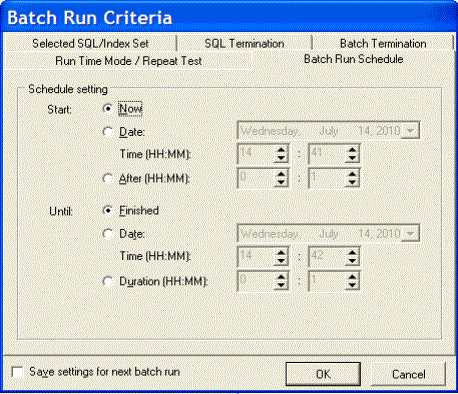
The Batch Run Schedule criteria enable you to schedule when to start and stop the Batch Run.
Tip: To save all settings on the Batch Run Criteria dialog for subsequent batch runs, select Save setting for the next batch run.
|
Start |
Description |
|
Now |
Specify to start the Batch Run immediately. |
|
Date and Time |
Specify to start the Batch Run at a specific date and time. If you click the month, day, year, you can use the up or down arrows to change the value. |
|
After |
Specify to start the Batch Run after it has been running for a specified number of hours and minutes. |
|
Until |
Description |
|
Finished |
Specify to run the entire Batch Run until all alternatives are executed. |
|
Date and Time |
Specify to terminate the Batch Run on the specified date and time. If you click the month, day, year, you can use the up or down arrows to change the value. |
|
Duration |
Specify to terminate the Batch Run after it has executed a specified number of hours and minutes. |
Quest SQL Optimizer for IBM® DB2® LUW maximizes SQL performance by automating the manual, time-intensive and uncertain process of ensuring that SQL statements are performing as fast as possible. SQL Optimizer analyzes, rewrites, and evaluates SQL statements within multiple database objects, files. With SQL Optimizer, you can analyze and optimize all your problem SQL from multiple sources. SQL Optimizer also provides you a complete index optimization and plan change analysis solution, from index recommendations to simulated index impact analysis, through comparison of multiple SQL access plans.
SQL Optimizer provides you with the following main modules.
SQL Optimizer (including SQL Rewrite and Generate Indexes functions)

