On Demand Migration - DirSync (ODMAD DirSync) is not migrating user account or group.
Possible reasons:
Workflow is missing the required step(s) to complete the sync
Stage does not include source OU, where user or group are located
Template is set with "do not create option" for the object type
Target user or group already exists and workflow is trying to create an object with attribute, that must be unique, but already exists in the target domain. For example: samAccountName.
Etc.
High Level of the minimum for a workflow to work in sequence. Steps can be separated in a separate workflows for better control and log handling.
1) Read
2) Match
3) Stage
4) Write
Sample Screenshot of the Full Workflow
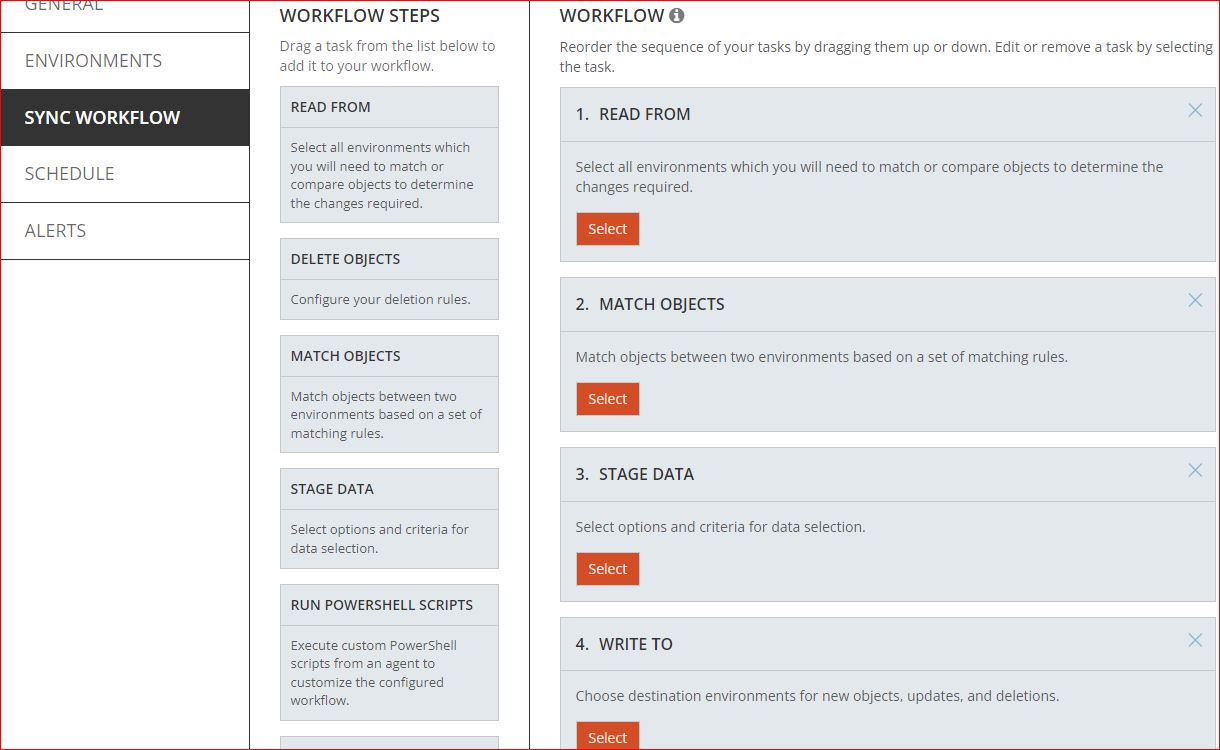
Details can be referred to in the document here.
Workflow is designed to run modules (Read, Match, Stage, Write) in a sequence. Only Read and Write are actually communicating with the environment. Match and Stage are working with the backend database objects only.
Read is reading/ingesting objects from the environment to the backend database.
Match is establishing a matching relationship between objects in the database using provided rules. Matching is directional.
Stage is comparing matched objects and deciding if changes need to be applied to the target object and what attributes should be applied according to the template. As a result, Stage is creating a "changeset" for each processed object.
Write is committing those changesets into the target environment.,

